
A WooCommerce shipping cost audit helps you answer a question that is surprisingly easy to overlook: does the amount your store charges for delivery cover what you expect to spend fulfilling the shipment? Your checkout can be working perfectly, customers can be placing orders, and you can still have shipping rules that leave part of the delivery cost uncovered.
That does not automatically mean an order is unprofitable. Some stores intentionally pay part of the delivery cost from their product margin to encourage conversions. The important point is to know when that happens and make the decision deliberately, rather than discovering the difference after dozens of orders.
In this guide, you will learn how to compare shipping charges with estimated delivery costs, review WooCommerce zones and classes, examine free-shipping offers, and identify scenarios that deserve closer investigation. You will also see how Altrix Shipping Profit Guard for WooCommerce can make a focused shipping-cost review easier without automatically changing checkout prices.
Table of Contents
What Is a WooCommerce Shipping Cost Audit?
A shipping cost audit is a structured review of what your online store collects for delivery and what delivering an order is expected to cost your business. It connects three pieces of information:
- Customer shipping charge: the shipping amount that WooCommerce is configured to collect for a particular scenario, excluding shipping tax where applicable.
- Estimated merchant delivery cost: an assumption based on courier pricing, packaging, handling, product weight, destination or other relevant expenses.
- Potential shipping shortfall: the positive difference when the estimated delivery cost exceeds the customer charge.
The simplified calculation is:
Potential shipping shortfall = Estimated delivery cost − Customer shipping charge, when the result is greater than zero.
For example, if you expect delivery to cost $14 and checkout collects $8, the modeled shipping shortfall is $6. If checkout collects $16 instead, the calculation does not indicate a shipping shortfall for those assumptions.
Neither result is an overall profit calculation; product cost, discounts, payment fees, taxes, returns and other expenses still matter.
A good WooCommerce shipping cost audit reveals possible gaps and gives you a repeatable way to check them. It should never be treated as a replacement for carrier invoices or actual checkout testing.
Why WooCommerce Stores Can Undercharge for Shipping
Shipping costs rarely stay identical across all products and destinations. A fixed charge may work well for a small, lightweight item but provide insufficient coverage for a bulky product sent to a distant region. Free-shipping promotions can change the numbers further.
Here are common situations worth investigating.
1. A Flat Rate Does Not Reflect the Order’s Delivery Requirements
WooCommerce includes a Flat Rate shipping method. You can configure a general cost and, where relevant, additional shipping-class charges. A simple flat rate is convenient, but the customer-facing amount may not reflect your actual parcel expense.
For example, a $7 flat shipping charge might comfortably cover one compact accessory. The same charge may be inadequate for a long package that costs $18 to send.
That difference deserves review even if customers are happy with the checkout experience.
2. Free Shipping Is Offered Without a Cost-Coverage Review
Free shipping can be an effective offer. But free to the customer is not free to the merchant. Someone still pays the carrier, materials and handling costs.
Suppose a store offers free shipping on orders of $75 or more. A qualifying item priced at $79 may trigger a $0 shipping charge, while the merchant estimates $12 in delivery costs.
That is a $12 modeled shipping-cost gap. It may be acceptable if the product margin supports it, but the decision should be intentional.
Review promotional thresholds, the margins of eligible products, and whether large or heavy items require different handling. Check the actual checkout because coupons, multiple products and third-party shipping logic can change the outcome.
3. Shipping Classes Are Missing or Assigned Incorrectly
Shipping classes help group products that need different shipping treatment—for example, standard, bulky or fragile merchandise.
A class does not independently set the shipping price. It works with methods such as Flat Rate to influence the amount charged.
A product assigned to the wrong class may not receive the cost you intended. Likewise, a newly imported product with no class might fall into a general rule that was designed for smaller items.
A periodic class audit is particularly important after bulk imports or catalog changes.
4. Product Weights and Dimensions Are Incomplete
Missing or zero product measurements make it harder to estimate shipping reliably.
An item’s packaged volume can also affect carrier billing even when its physical weight is low.
For example, a large, lightweight lampshade may cost more to ship than a small item weighing the same amount.
Reviewing missing weights, dimensions and unusually heavy or long products can expose scenarios needing better delivery-cost assumptions.
5. Zones and Destination Rules Are Overlooked
WooCommerce shipping zones determine which shipping methods customers can access according to their destination.
Zone order matters: WooCommerce matches an address to the first applicable zone. A rate configured for one zone should not be assumed to apply to every customer.
A WooCommerce shipping cost audit should therefore consider important destinations separately.
Test representative postcodes or addresses and verify that the intended method and amount actually appear at checkout.
How to Calculate a Potential Shipping Shortfall
Start with a straightforward, realistic scenario.
Use the same currency for the merchant estimate and the customer charge, and compare amounts consistently excluding recoverable taxes.
| Audit item | Example amount |
|---|---|
| Product selling price | $60.00 |
| Shipping charged to customer | $8.00 |
| Estimated delivery cost | $14.00 |
| Potential shipping shortfall | $6.00 |
The customer contributes $8 toward an estimated $14 delivery expense. The modeled gap is $6.
You can choose to absorb that gap, adjust the shipping offer, or investigate a lower-cost fulfilment option.
Crucially, a $6 shipping shortfall is not the same thing as a $6 order loss.
The product may have enough margin to cover delivery. Alternatively, packaging, acquisition costs or refunds could make the overall order result worse.
Determining actual order profitability requires a wider financial review.
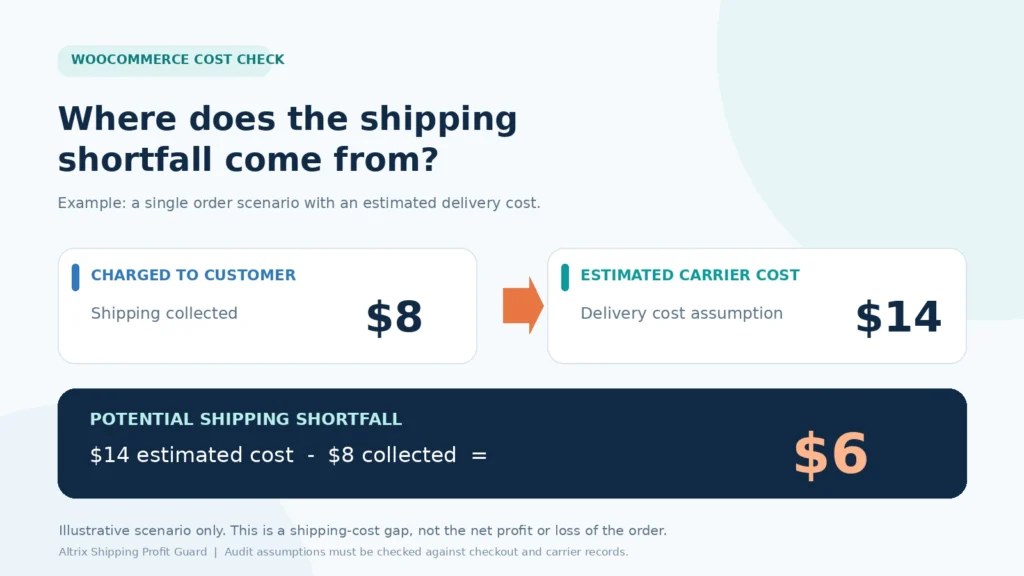
Image caption: Illustrative WooCommerce shipping cost audit: an $8 customer shipping charge versus a $14 delivery estimate creates a potential $6 shipping shortfall, not a calculation of net order profit.
WooCommerce Shipping Cost Audit: Step-by-Step Checklist
Use the following process before changing rates or installing additional tools.
Step 1: List Your Active Shipping Zones
In WordPress, go to WooCommerce → Settings → Shipping → Shipping zones.
Review each active zone, its geographic coverage and the methods enabled within it.
Look for overlapping areas, missing destinations, incorrect zone order and old methods that no longer match your current delivery arrangements.
Include your most common domestic and international destinations if you serve both.
Record the zones that represent the highest proportion of shipped orders. These are useful starting points for testing, but do not ignore low-volume destinations with disproportionately expensive delivery.
Step 2: Review Flat Rate and Free Shipping Methods
Open each important zone and inspect its available shipping methods.
Check the configured flat charge, any class-specific costs, and how the calculation behaves when different classes are present.
WooCommerce’s Flat Rate settings can calculate class costs per class or per order. The result can vary when customers buy products from different classes together.
Confirm the configuration rather than assuming it works a particular way.
For free shipping, record whether eligibility depends on a minimum amount, coupon or other condition.
Ask whether the product margin and average shipping expense make the promotion sustainable.
Do not assume a free-shipping threshold always produces the same result for a mixed cart.
Step 3: Check Product Weights, Dimensions and Classes
Select a small but representative sample of physical products:
- A typical lightweight item.
- A bulky or long item.
- A high-value product.
- A low-margin product.
- A product recently imported or updated.
- A variable product with variations that have different measurements.
Inspect the weight, dimensions and shipping-class assignment for each.
If a value is missing, determine whether it is genuinely unknown or simply omitted during catalog entry.
Do not substitute zero for an unknown delivery cost.
When using weight-based estimates, distinguish product weight from packaged weight.
Carriers may bill for the full packed parcel rather than just the item.
Step 4: Collect Realistic Delivery-Cost Assumptions
Gather recent carrier bills, fulfilment quotes or internal delivery records.
Create a basic cost reference for your main shipping zones and product groups.
Include packaging or handling costs if you want your estimate to reflect them.
A practical spreadsheet may contain the destination, item or class, typical parcel size, customer charge, estimated delivery cost and any relevant notes.
Keep your assumptions current, especially when carrier prices or surcharges change.
If you have no reliable cost for a route, mark it as unknown.
A misleadingly precise estimate can create more confusion than a flagged data gap.
Step 5: Compare Customer Charges With Estimated Costs
For each representative scenario, subtract the configured shipping charge from your delivery-cost estimate.
Give extra attention to scenarios where the estimate is greater than the amount collected.
Rank findings by both the size of the modeled gap and the frequency of the scenario.
A $2 gap on a frequently purchased item may deserve more attention than a $15 gap on a product that rarely sells.
These comparisons help you prioritize reviews; they do not establish realized losses.
Step 6: Test Checkout With Realistic Addresses and Carts
A settings review is only part of the process.
Place test items into a cart and select representative delivery addresses.
Confirm the customer-visible shipping methods and charges.
Test one-item orders first. Then check important multi-item combinations, especially when products from different classes are purchased together.
Include relevant coupons, free-shipping thresholds and any carrier-calculated or third-party methods.
Reconcile results with your estimated costs and carrier terms.
Step 7: Document, Correct and Recheck
Once you find a possible gap, determine its cause before changing anything.
The correct response might be to update missing product dimensions, revise a shipping class, reconsider a free-shipping threshold, change an assumption, or negotiate a carrier rate.
After making an approved change, test the checkout again.
Keep a record of the original issue, what changed and the date of verification.
A consistent review history is more useful than a one-time guess.
How Altrix Shipping Profit Guard Supports the Audit
Performing a WooCommerce shipping cost audit manually is possible, but reviewing many physical products and configurations can become repetitive.
Altrix Shipping Profit Guard for WooCommerce provides an on-demand, read-only way to flag supported scenarios for investigation.
The Free plugin can review published physical simple products and published variations individually.
It checks supported fixed numeric flat rates, shipping-class costs and selected free-shipping threshold scenarios.
It compares supported configured charges with a delivery-cost estimate entered by the merchant.
It also flags missing weight, dimensions and class assignments, plus configured heavy or long-item warning thresholds.
The audit processes catalog entries in pages of 25, without a total catalog-scan quota.
It does not automatically change products, orders or checkout shipping prices.
You remain responsible for evaluating the findings and making any needed changes.
What Shipping Profit Guard Pro Adds
The separately installed Pro add-on is offered at $29 as a one-time purchase and requires the Free plugin to stay installed and active.
Its additional features include:
- A delivery-cost model using a base amount, billable weight rate and handling cost.
- A configurable dimensional-weight divisor, useful when bulky products may incur volume-based billing.
- Reusable cost assumptions by shipping zone and shipping class.
- CSV export of the current product-audit page.
- Comparison of merchant-entered recorded delivery costs with original shipping charges for supported processing and completed orders.
The recorded order delivery costs must be entered manually; the plugin does not retrieve carrier invoices.
Order comparisons exclude shipping tax and use original shipping charges before refunds, so refunded orders require separate reconciliation.
Important limitations: the product audit models one product at the chosen quantity, as one assumed parcel, in a selected zone, without a coupon.
It does not fully reproduce mixed carts, automatic destination matching, live carrier quotes, third-party shipping methods, unsupported formulas or checkout filters.
Always verify flagged scenarios against actual checkout behavior and fulfilment records.
An Example of Weight and Dimensional Cost Modeling
Consider an item weighing 0.8 kg with an illustrative packed size of 40 × 30 × 20 cm.
If the chosen carrier uses a divisor of 5,000 for these units, the dimensional weight is:
(40 × 30 × 20) ÷ 5,000 = 4.8 kg.
The larger of actual and dimensional weight is 4.8 kg in this example.
Using illustrative assumptions of a $5 base, $3 per billable kilogram and $2 handling charge gives:
$5 + (4.8 × $3) + $2 = $21.40 estimated delivery cost.
If the customer shipping charge is $9, the potential modeled gap is $12.40.
This is an illustration of the calculation approach, not a carrier quotation.
Use the carrier’s actual dimensional rules and measure the packed parcel where appropriate; product dimensions alone may not match packed dimensions.
How Often Should You Run a WooCommerce Shipping Cost Audit?
A monthly review is a sensible operational starting point for many stores, although the ideal frequency depends on catalog size, carrier agreements and how often rates change.
You should also repeat relevant checks after updating carrier contracts, introducing new products, bulk-importing variations, changing free-shipping promotions, editing shipping classes or adding new delivery regions.
During a store migration, include shipping configuration in your launch checklist.
For a larger store, consider auditing one high-impact zone or product group at a time and then working through the rest of the catalog.
Keep the scope manageable enough that someone actually checks and resolves the findings.
How to Use Your WooCommerce Shipping Cost Audit to Reduce Gaps
The purpose of a WooCommerce shipping cost audit is better decision-making, not automatically raising every checkout charge.
Consider a balanced approach:
Improve data quality. Correct missing product weights, dimensions and classes before changing price rules based on incomplete records.
Review free-shipping economics. Compare the threshold against realistic delivery costs and product margins. A higher threshold is not necessarily better if customers abandon their carts; test changes rather than guessing.
Segment where justified. Bulky or special-handling products may warrant different shipping-class treatment, while compact products can retain a simpler offer.
Check packaging choices. A more appropriate box or packaging configuration may lower billable dimensions without reducing protection. Validate this with the carrier.
Monitor carrier invoices. Reconcile estimated costs with actual recorded costs periodically, especially for routes with surcharges or frequent price changes.
Communicate clearly. Customers should understand shipping charges and eligibility before the final checkout stage. A cost-recovery change that surprises buyers can undermine trust.
If you also need to review product pricing independently, Altrix offers a separate Price & Margin Guard for WooCommerce product.
Keep pricing and shipping analysis distinct: neither simple check alone is a complete order-profit statement.
Common WooCommerce Shipping Cost Audit Mistakes to Avoid
One frequent mistake is comparing a shipping fee including tax with an estimated merchant cost that excludes recoverable tax. Keep definitions consistent.
Another is assuming a single product estimate predicts a mixed-cart shipment.
Multiple products may be packed together, sent separately or assigned different shipping methods.
A one-parcel audit assumption is a useful screening tool, not a full packing engine.
Avoid treating an estimated shortfall as proven financial loss.
An order can remain profitable despite a shipping subsidy; an order can also lose money for reasons unrelated to shipping.
Finally, do not automatically change shipping settings because an audit flags a scenario.
Confirm whether the rate is supported, whether the input data is correct, and whether the actual checkout and carrier records agree.
Frequently Asked Questions
How do I check if my WooCommerce shipping charges are too low?
Compare the shipping amount configured for a representative zone and cart with a realistic delivery-cost estimate.
Investigate positive differences, then test the same scenario at checkout and against carrier records.
Remember that the difference measures shipping-cost coverage, not overall order profitability.
Does WooCommerce calculate my shipping profit automatically?
WooCommerce provides shipping methods and stores order information, but built-in shipping configuration is not itself a complete calculation of net shipping or order profitability.
A separate audit and reliable merchant-cost records are needed for meaningful comparisons.
Does free shipping mean the order is losing money?
No. It means the customer is not charged separately for delivery.
The store may choose to absorb the cost from its product margin.
Review the full economics before deciding whether the offer is sustainable.
Can I audit variable products and their variations?
Yes, you can inspect shipping data for individual variations.
Altrix Shipping Profit Guard Free audits supported published variations individually rather than treating a variable parent product as a shippable audit row.
Will Shipping Profit Guard change rates at checkout?
No. Shipping Profit Guard is an on-demand review tool.
It reports supported modeled findings and leaves shipping-rate, product and order changes to the store administrator.
Is Shipping Profit Guard Pro required for a basic audit?
No. The Free plugin supports an initial review using a merchant-entered delivery estimate and supported fixed-rate scenarios.
Pro adds more detailed modeling, reusable cost profiles, CSV export and manual order-cost comparisons.
Final Checklist and Next Step
A reliable WooCommerce shipping cost audit begins with good product data, clearly documented delivery assumptions and real checkout verification.
Review shipping zones and methods, check free-shipping promotions, investigate physical-product measurements, and compare customer charges with realistic merchant costs.
Use the findings to guide informed decisions, not automatic price increases.
If you want to review supported shipping configurations more systematically, start with Altrix Shipping Profit Guard for WooCommerce.
Try the Free edition first, and consider the $29 Pro add-on when your store needs dimensional-cost modeling, reusable profiles, CSV exports or recorded order-cost comparisons.
This article provides operational guidance and illustrative calculations. Audit estimates are not live carrier quotes, tax advice or proof of realized order profit or loss.