
Website Handover Report Builder for professional client handoffs
Transform completed checklists, screenshots and project notes into a clear, branded website handover report your client can understand, approve and keep.
One-time purchase for this version • Works locally in Chrome or Edge • No subscription

Deliver more than a final email
A website handover should make completed work, outstanding actions and ongoing responsibilities easy to understand. The builder gives you a repeatable process instead of recreating a document for every project.
Show what was completed
Record each deliverable with a clear status, notes and supporting evidence.
Clarify ownership
Document who manages accounts, renewals, resources and next actions after launch.
Strengthen your brand
Add your agency identity and present a professional report that feels part of your service.
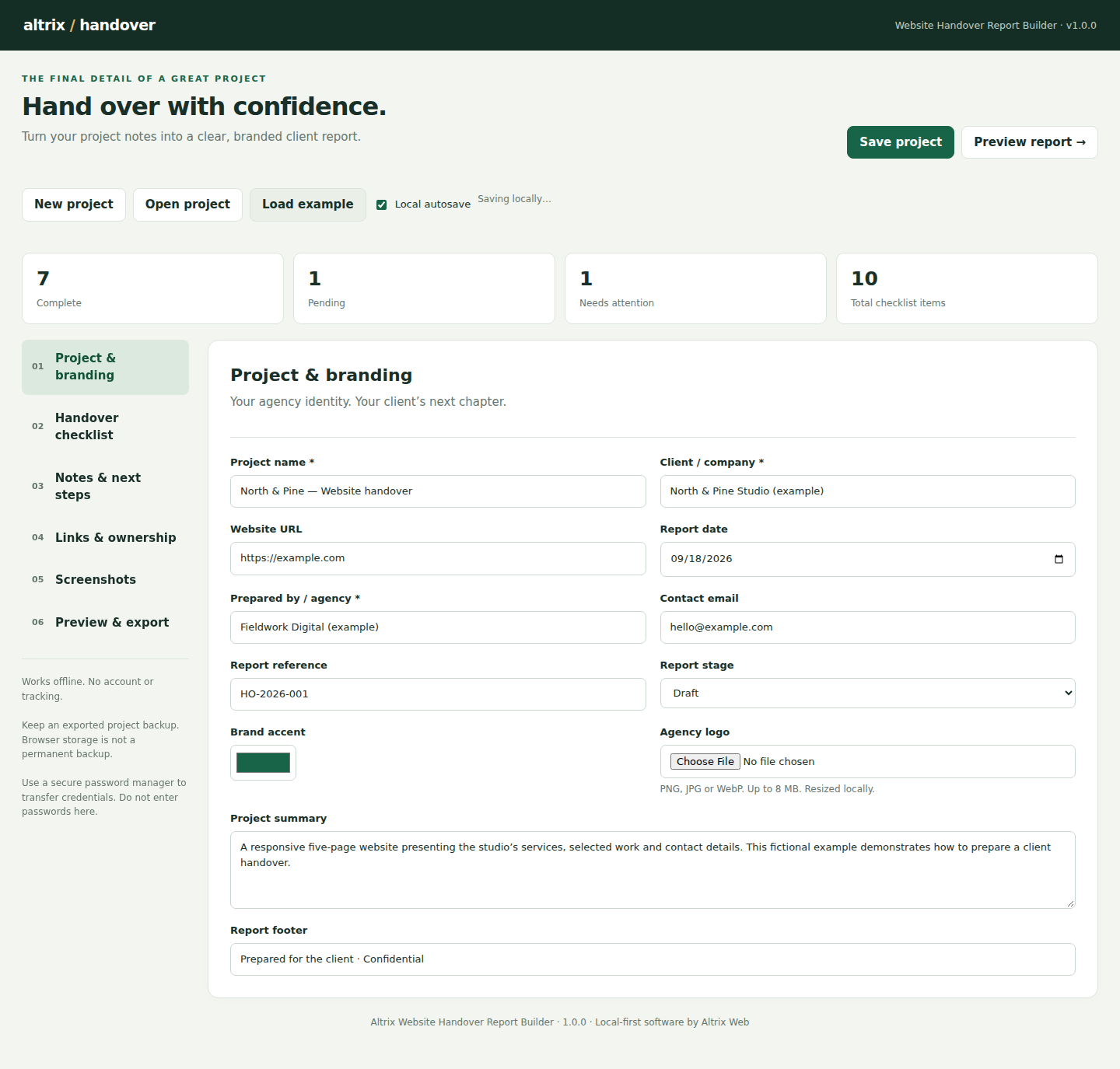
Organize project information, checklist items, responsibilities and evidence in one workspace.
Everything needed for a confident handover
- Agency logo, brand color and contact details
- Client, website and project reference information
- General website, WordPress and Shopify checklist templates
- Complete, Pending, Needs attention and Not applicable statuses
- Delivered work, exclusions, known issues and next actions
- Resource links, responsible owners and renewal dates
- Up to 12 screenshots with captions
- Reusable JSON project backups
From project notes to a professional report
The Website Handover Report Builder needs no complicated installation or account setup. Open the application in your browser and follow a practical three-step workflow.
Enter the project details
Add the client, website, agency identity and the scope you are handing over.
Document the delivery
Update checklist statuses, add notes, links, owners, dates and screenshot evidence.
Export and deliver
Generate a self-contained branded HTML report or use your browser to save it as PDF.
A report clients can actually use
The final report turns scattered technical details into an organized client document. It provides a lasting record of project status, responsibilities and recommended next steps.
- Clear summary and completion overview
- Branded presentation suitable for client delivery
- Visible pending work and attention items
- Supporting screenshots and useful resource links
- Print-friendly layout for browser PDF export
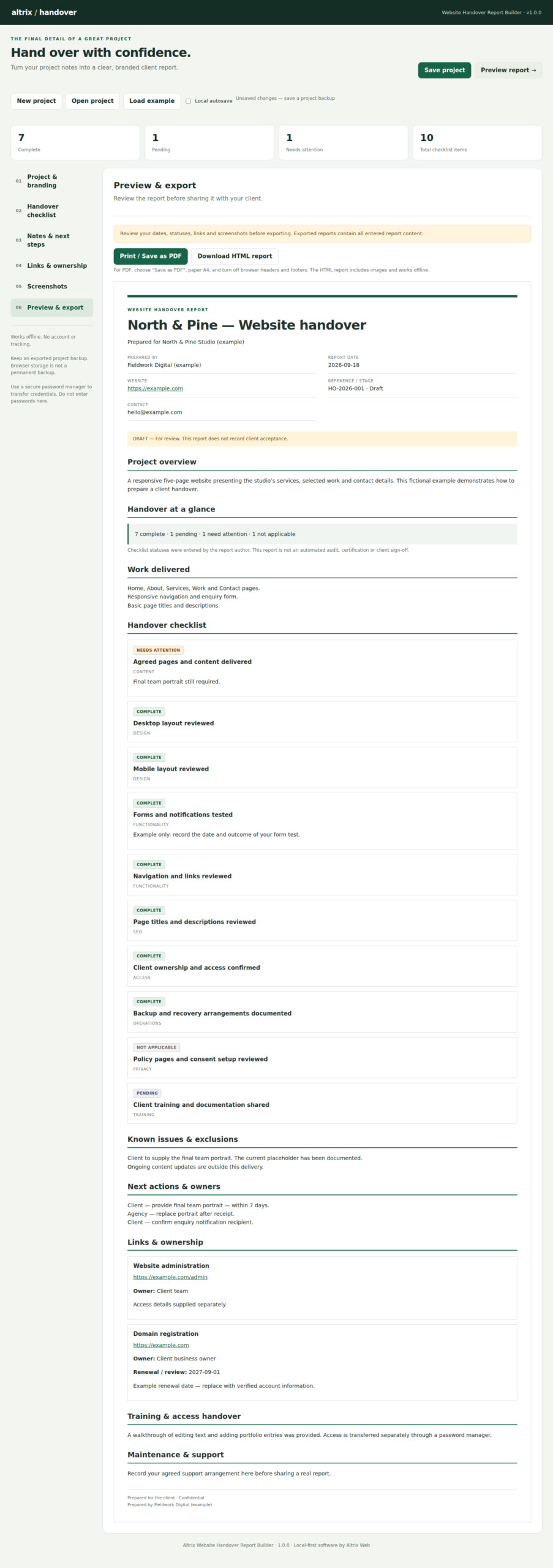
Preview the finished report before exporting and sharing it with your client.
Useful across your web projects
Freelance web professionals
Create a consistent handover without rebuilding a Word document after every website project.
Web design agencies
Give team members a repeatable reporting process and deliver documentation under your agency brand.
Maintenance providers
Record the current state of a website, open items, responsibilities and future recommendations.
Make your next handover look as professional as the website
Download the standalone application, extract the ZIP and open it in your desktop browser.
Before you download
Is this a WordPress plugin?
No. The Website Handover Report Builder is a standalone browser application. Extract the downloaded ZIP and open Website-Handover-Builder.html in Chrome or Edge.
Does the application need an internet connection?
The builder runs locally in your browser and does not require an ongoing connection for normal use after download.
Can I use my own agency branding?
Yes. Add your agency logo, brand color and business details to create a client-facing report under your identity.
Can I reopen a project later?
Yes. Save an editable JSON project backup and load it again when you need to revise or re-export the report.
How do I create a PDF?
Preview the generated report, open the browser print dialog and choose the Save as PDF option.
Where is project data stored?
The application processes project information and screenshots locally on your computer. Keep your downloaded backup files in a secure project folder.
Website Handover Report browser compatibility
For the best experience, use a current desktop version of Google Chrome or Microsoft Edge. The builder runs locally after download.
Finish every website project with clarity
Use the Website Handover Report Builder to replace scattered notes and rushed emails with a professional, branded handover report your client can refer to after launch.
Get Website Handover Report Builder — $39