
Launching a WooCommerce store involves more than uploading products and making the homepage look attractive. A shopper may reach a product page with a missing image, select a variation without a price, or discover that the item they want is unavailable. A store can look finished to its owner while important catalog details remain incomplete.
That is why a WooCommerce product catalog audit belongs on every pre-launch checklist. It helps you identify missing information, inconsistent product settings, and potential customer-facing problems before you invite visitors to shop. It is also useful after supplier imports, bulk updates, migrations, and major catalog changes.
This guide explains how to complete a WooCommerce product catalog audit step by step. You can perform the checks manually, use spreadsheet exports where appropriate, or use a read-only auditing plugin to find issues more systematically. The goal is not a perfect-looking dashboard score; it is a catalog that customers can understand, browse, and purchase from confidently.
Table of Contents
What Is a WooCommerce Product Catalog Audit?
A WooCommerce product catalog audit is a structured review of the information and settings attached to products in your store. It examines whether products have usable names, prices, images, descriptions, categories, identifiers, inventory information, and any variations or shipping details they require.
An audit is different from routine product entry. When adding one product, you look at that product. During an audit, you look for patterns across the whole catalog: ten products accidentally assigned to “Uncategorized,” a group of imported variations without prices, or a collection of physical items missing dimensions.
The audit also helps separate technical blockers from editorial improvements. A missing variation price may stop that option from appearing as expected, whereas a weak description may leave the product purchasable but less helpful to customers. Both deserve attention, but not necessarily the same urgency.
Quick WooCommerce Product Catalog Audit Checklist
Use this checklist before a new store goes live or after a major product update:
- Confirm each intended product is published and visible in the correct place.
- Review product names, URLs, and product types.
- Confirm categories are meaningful and easy to navigate.
- Check regular prices, sale prices, and scheduled discounts.
- Review missing, inconsistent, or duplicate SKUs according to your inventory policy.
- Confirm primary images and useful gallery images are present.
- Review short descriptions and full descriptions for clarity.
- Test variable products and each important variation combination.
- Check stock status, quantities, backorders, and featured out-of-stock products.
- Review shipping weight, dimensions, and shipping classes where needed.
- Test downloadable files and external-product destinations when applicable.
- Inspect product search appearance and relevant structured data.
- Test real product pages, cart behavior, and checkout.
- Record outstanding issues and recheck corrected products.
The sections below explain how to complete each part of this WooCommerce product catalog audit checklist without making unnecessary changes to a live store.
1. Confirm Product Status, Visibility, and Product Type
Start your WooCommerce product catalog audit in WordPress Dashboard → Products → All Products. Sort or filter your list so you can review items intended for launch. Note which products are drafts, pending review, private, hidden from the catalog, or published.
A draft is not necessarily an error. Some products are deliberately held for a future release. The problem occurs when the intended storefront and the actual product status disagree. Check that your launch collection contains all products customers are supposed to see—and excludes products that are not ready.
Also confirm the correct WooCommerce product type. A simple physical product, a variable product, a digital download, and an external/affiliate product do not have identical requirements. Product-type mistakes can create confusing purchase experiences even when the title and image look right.
Practical check: Open a selection of products as a logged-out visitor. Can customers find them through their intended category or shop page? Are any unfinished products unintentionally visible?
2. Audit Product Titles, Categories, and Navigation
For a WooCommerce product catalog audit, start by checking whether each product title identifies the item clearly. It should tell a shopper what they are viewing without relying on unexplained internal codes or excessive keywords. For example, “Cotton Crew-Neck T-Shirt — Navy” is generally clearer than “Item 7482 Blue.”
Review category assignments next. WooCommerce product categories are hierarchical, so a logical structure such as Clothing → T-Shirts can help people navigate a large catalog. Check for products left in a default category, duplicated near-identical categories, and category names that differ only by spelling. A WooCommerce product catalog audit should verify navigation as well as field completeness.
Do not create separate categories for every minor product attribute. Color and size are often better represented by attributes and variations. Review product tags only where they add meaningful discovery value.
A WooCommerce product catalog audit should also include product URLs. Keep slugs readable and stable. If you must change a URL that has already been indexed or linked externally, plan and test the appropriate redirect instead of casually replacing it.
3. Verify Regular Prices, Sales, and Currency Display
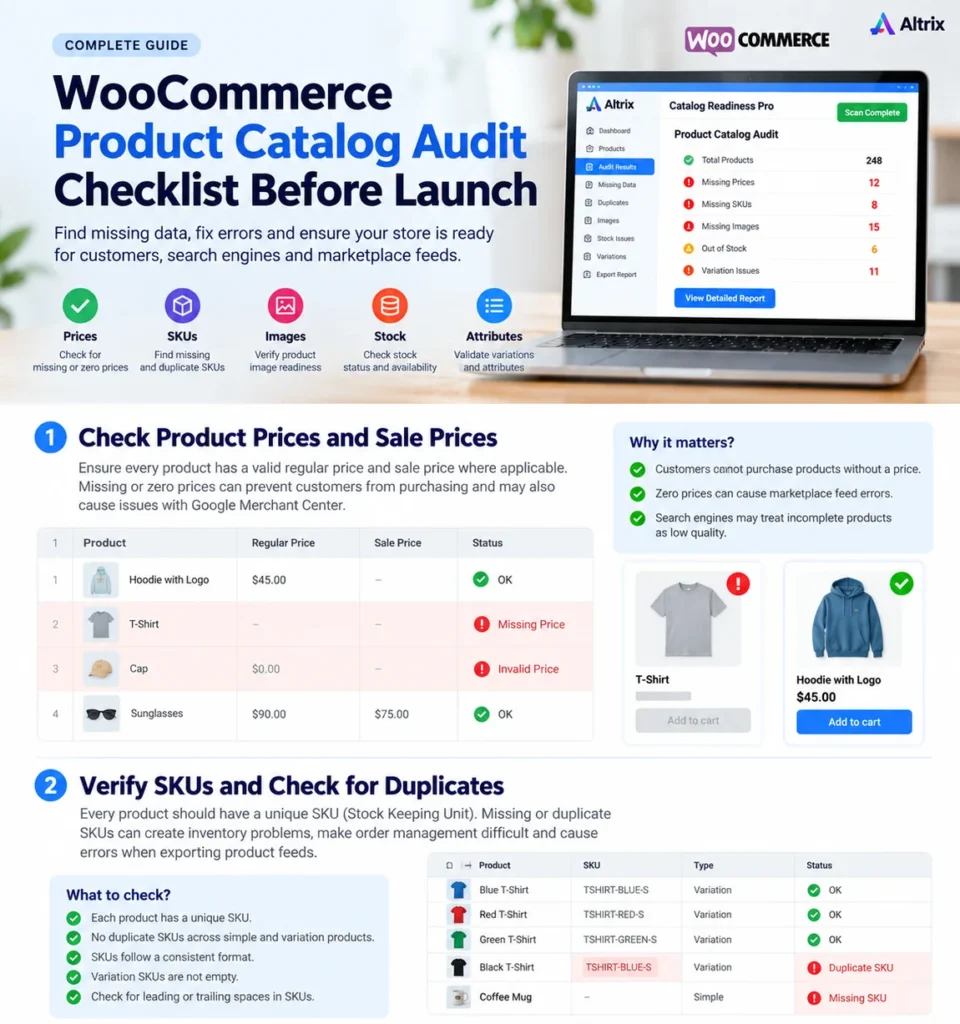
Prices deserve early attention because they directly affect buying decisions. For simple products, review the regular price and any sale price. For variable products, examine the prices of the actual variations rather than assuming the parent product covers every option.
Look for blank prices, accidental zero values, misplaced decimal points, and discounts that do not match your promotion plan. This is a particularly important part of a WooCommerce product catalog audit for stores with frequent price imports. A price of zero can be intentional for a free item, so treat it as a review item rather than automatically labeling it an error.
Where sale schedules are used, verify their start and end dates. Confirm the storefront displays the correct currency and that tax display settings are consistent with the store’s configuration and applicable requirements.
Example: If a product normally sells for $49 and a scheduled sale should reduce it to $39, check the actual product page before and during the promotion. A saved setting alone is not proof that the public price display is correct.
4. Check Missing and Duplicate SKUs
In a WooCommerce product catalog audit, a stock keeping unit (SKU) can connect a WooCommerce product to a supplier sheet, inventory system, warehouse process, or reporting workflow. Not every business uses SKUs the same way, but consistency matters.
During the WooCommerce product catalog audit, identify products that should have an SKU but do not. Check for accidental duplicates, spaces added during imports, inconsistent naming patterns, and codes applied to the wrong variation.
For example, TSHIRT-NAVY-M and TSHIRT-NAVY-L clearly distinguish sizes. A duplicated TSHIRT-NAVY-M assigned to two different stock items should be investigated before orders arrive. Remember that some variation setups inherit product-level identifiers or deliberately omit separate variation SKUs; review your chosen inventory workflow before changing them.
If you use supplier imports, check identifiers before and after each bulk update. A spreadsheet comparison or catalog audit report can make unusual changes easier to detect.
5. Review Product Images and Galleries
A WooCommerce product catalog audit should review images because they communicate information that descriptions cannot always convey. Check whether every customer-facing product has a suitable main image. For important items, review the gallery for useful alternate angles, close-ups, packaging, or real-world context.
Look for broken or incorrect image assignments, inconsistent crops, distorted proportions, and blurry assets. If a product comes in several visually distinct variations, verify that shoppers can see the right representation when they make a selection.
Descriptive image filenames and accurate alternative text can help accessibility and clarify the image’s purpose. Avoid filling alt text with unrelated keywords; describe what the image actually shows. Also review image file sizes so oversized assets do not unnecessarily slow the page.
For a WooCommerce product catalog audit before launch, missing images should usually be resolved before the affected product is promoted. An audit tool can flag absent product images, but a human still needs to select appropriate replacements and verify presentation.
6. Improve Short Descriptions and Full Descriptions
A short description helps shoppers quickly understand the item, while the longer description can explain materials, features, compatibility, dimensions, care instructions, limitations, and other decision-making details.
Check for empty descriptions, placeholder text, repeated supplier copy, inconsistent formatting, and promises that are not supported by the product. A technically complete description is not automatically a persuasive or accurate one.
For example, “Premium quality, best product, must buy” gives a customer little useful information. A better description tells them the actual material, dimensions, intended use, fit, or compatibility—whichever facts matter for that item.
During your WooCommerce product catalog audit, prioritize descriptions for high-traffic, high-value, or frequently questioned products. Do not invent specifications just to fill a content field. When information is unavailable, verify it with the supplier or manufacturer.
7. Test Variable Products and Attributes
Variable products deserve their own review because customers select combinations such as size, color, or material before purchasing. In WooCommerce, individual variations can have their own prices, inventory settings, images, and other data.
Open each important variable product and confirm that the intended attribute combinations exist. Check whether variations are enabled, correctly priced, and available under the expected stock rules. Pay close attention to cases where a variable product has no actual variations configured.
Example: A shirt may have three sizes and two colors. That suggests six intended combinations if every size is offered in both colors. If only four variations exist, determine whether two combinations are intentionally unavailable or were missed during setup.
As part of the WooCommerce product catalog audit, test the selection process on the public product page. The price, availability message, image, and add-to-cart behavior should make sense when customers change options. For more detailed variation diagnostics, see Altrix Woo Variation Check. For configuration instructions, refer to the official WooCommerce variable product documentation.
8. Confirm Inventory Status and Featured Products
Inventory mistakes are another priority in a WooCommerce product catalog audit because they can create frustration after launch. Review whether products are marked in stock, out of stock, or available on backorder as intended. For stock-managed products, confirm quantities and low-stock thresholds are reasonable for your operation.
Check that variations follow the correct stock policy. A parent product appearing available does not necessarily mean every variation can be purchased. Test at least the popular combinations and any options that have recently changed.
Pay attention to featured items: a homepage promotion for an unexpectedly out-of-stock product can waste valuable attention. Catalog Readiness Pro includes a specific check for featured products that are out of stock, but you should still verify the storefront and any promotional modules manually.
9. Verify Weight, Dimensions, and Shipping Setup
Physical products may need weight and dimensions for shipping calculations or carrier integrations. Missing information is especially important when your shipping method depends on package size or weight.
Check the relevant values in each product’s shipping settings. Make sure units are consistent, shipping classes are assigned correctly where used, and oversized or unusual products receive the appropriate handling rules.
A digital product may legitimately have no shipping measurements. Therefore, this part of a WooCommerce product catalog audit requires product-type awareness rather than treating every blank dimension field as a mistake.
After completing the shipping-data portion of your WooCommerce product catalog audit, run a few test carts with realistic destinations. Product data can be correct while shipping rules, rates, or checkout messaging still need attention. A catalog audit does not replace shipping configuration testing.
10. Check Downloadable and External Products
For downloadable products, confirm that each required file is attached, the file is the correct version, and any download limits or expiry settings match your delivery policy. Test the customer-facing download process using an appropriate test order.
For external or affiliate products, review the destination URL, link text, and the page customers reach. Broken links and outdated destinations create a poor experience even when the product’s WooCommerce entry appears complete.
These are examples of the advanced checks available in Catalog Readiness Pro. The plugin can help flag readiness issues, but it does not replace opening links, testing file access, or confirming a successful transaction.
11. Review Product SEO and Merchant Data
Once the WooCommerce product catalog audit covers essential product data, review how important products appear to search engines. Use descriptive titles, sensible internal links, original product information where possible, and images that genuinely match each item.
For eligible product pages, Google can use structured data to understand properties such as prices, availability, and product identifiers. Depending on how your products are sold, the relevant implementation may involve product or merchant-listing markup. Validate your setup with Google’s Rich Results Test and follow the official product structured data guidance.
If you submit product data through Google Merchant Center, compare the feed with the information shown on the actual product page. Consistency matters; a feed that claims one price or availability status while the page shows another needs attention.
Importantly, a WooCommerce product catalog audit does not guarantee better Google rankings or Merchant Center approval. It helps you identify incomplete product information; ranking and feed eligibility depend on additional technical, content, policy, and market factors.
12. Test the Customer Journey Before Launch
A WooCommerce product catalog audit can pass data checks and still miss a customer-facing problem. Make time for a manual walkthrough on desktop and mobile. Begin on a category page, open an individual product, choose a variation if applicable, add the item to the cart, and proceed through checkout using a safe test-payment process.
Look for mismatched images, confusing variations, unexpected prices, missing purchase controls, incorrect availability messages, and shipping options that do not match the order. If your store is not ready to accept payments, use staging or the payment provider’s supported test mode.
Do not limit testing to your newest products. Test bestselling items, sale products, variable products, physical products with shipping rules, and any downloads or external products. Include a product that was recently imported or bulk-edited.
For a meaningful WooCommerce product catalog audit, combine automated issue detection with this real storefront review. Neither approach fully substitutes for the other.
13. Prioritize Issues: Blocking, Warning, or Ready
A WooCommerce product catalog audit becomes useful when findings lead to an organized action plan. Consider grouping results into three practical categories:
- Blocking: Problems likely to prevent an intended item or variation from being purchased or used correctly, such as a missing required variation price or a missing download file.
- Warning: Information that needs review but may not completely block a sale, such as an incomplete description or absent shipping dimensions for certain physical products.
- Ready: Products that meet the audit’s currently checked requirements, while still requiring sensible spot checks.
Prioritize issues based on impact, not simply the number of warnings. A missing main image on your top-selling product may deserve attention ahead of several minor description edits on products scheduled for later release.
Keep a brief record of who owns each fix, what changed, and whether the product was retested. If you correct products in bulk, retain a backup or export so you can investigate unintended changes.
How Altrix Catalog Readiness Pro Helps With the Audit
Manually checking a small catalog may be manageable. With hundreds of products, repeated imports, or multiple contributors, a structured WooCommerce product catalog audit becomes harder to perform consistently.
Altrix Catalog Readiness for WooCommerce is designed to help store owners, developers, and agencies identify product-data issues without automatically modifying product records. The free edition checks core concerns such as missing images, prices, SKUs, useful categories, descriptions, and publishing status. It also provides catalog-health information and filters to help review results.
Catalog Readiness Pro adds deeper diagnostics, including duplicate SKUs, missing shipping weight or dimensions, variable products with no variations, selected downloadable and external product problems, sale-date readiness, and featured out-of-stock checks. Pro also supports CSV exports of all results or problems only, which can help with review and handover workflows.
The plugin scans inside your WordPress installation and is read-only: it flags items for human review rather than automatically correcting them. It does not replace checkout testing, supplier verification, content editing, or Google Merchant Center validation.
Want a more organized pre-launch review? Explore Altrix Catalog Readiness Pro for WooCommerce, compare the free and Pro features, and choose the level of auditing that suits your store.
When Should You Repeat a WooCommerce Product Catalog Audit?
Do not treat a WooCommerce product catalog audit as a one-time launch task. Repeat targeted checks after a large product import, supplier price update, migration, changes to variation options, seasonal promotions, or a major catalog cleanup. Agencies can also perform a review before handing a WooCommerce store to a client.
The right frequency depends on how often the catalog changes. A small shop with occasional edits may need a focused review after each update. A frequently updated store may benefit from a recurring routine and documented responsibility for checking warnings.
Frequently Asked Questions
What is the purpose of a WooCommerce product catalog audit?
A WooCommerce product catalog audit helps identify missing or inconsistent product details before they create customer confusion or operational problems. It covers information such as prices, images, identifiers, categories, descriptions, variations, and relevant stock or shipping data.
Can I audit a WooCommerce catalog manually?
Yes. Start at Products → All Products, review key fields, test representative product pages, and record findings in a spreadsheet. Manual checking is practical for smaller catalogs, but an auditing plugin can help organize checks across larger collections.
Does every WooCommerce product need an SKU?
Not necessarily. SKU requirements depend on how your store handles inventory, reporting, suppliers, and integrations. The important part is to follow a clear policy and investigate missing or duplicated identifiers where they could cause confusion.
Are missing product descriptions a launch blocker?
Not always. A missing description may not prevent a purchase, but it can leave buyers without essential information. Prioritize products where accurate details influence compatibility, sizing, safety, expectations, or returns.
Does Catalog Readiness Pro automatically fix missing prices or duplicate SKUs?
No. Altrix Catalog Readiness Pro is a read-only scanner. It helps identify relevant issues and provides reporting tools, while you remain responsible for reviewing and correcting product information in WooCommerce.
Is a catalog audit the same as an SEO audit?
No. A catalog audit focuses on product information and readiness. An SEO audit also considers indexing, crawl access, canonical URLs, internal linking, content quality, structured data, performance, and other factors beyond product field completeness.
When should I audit my WooCommerce store?
Perform a WooCommerce product catalog audit before launch and repeat relevant checks after major imports, migrations, bulk edits, promotional updates, and substantial changes to product variations or inventory.
Final Thoughts
A successful launch starts with products that are easy to find, understand, and purchase. A practical WooCommerce product catalog audit checklist gives you a repeatable way to uncover missing prices, images, descriptions, identifiers, variation settings, and other issues before customers encounter them.
Start with essential data, test the real shopping experience, and review the highest-impact warnings first. If your catalog is large or frequently updated, Altrix Catalog Readiness Pro can help structure the review—while keeping the final corrections in your hands.