
Testing website redirects individually can be manageable when you have five or ten URLs. But what happens when a website migration involves 200, 500, or even thousands of old pages?
Opening each URL in a browser, recording its destination, and checking its HTTP status manually can take hours. More importantly, manual testing makes it easy to overlook broken links, unexpected destinations, redirect chains, and temporary redirects that should be permanent.
A more systematic approach is to test website redirects using CSV files. By preparing a spreadsheet containing your old URLs and their expected destinations, you can perform bulk redirect verification and identify problems much faster.
This guide explains how to prepare your redirect CSV, understand HTTP status codes, verify hundreds of URLs, interpret results, and document corrections after a migration.
You’ll also learn how the Altrix Redirect Verification Tool can simplify the process without requiring a cloud-based SEO platform.
Table of Contents
Why Website Redirect Testing Matters for SEO
Website redirects tell browsers and search engines where to go when a page has moved.
They are particularly important during:
- Website redesigns that change URL structures.
- WordPress, Shopify, WooCommerce, or Magento migrations.
- Domain changes and website rebranding.
- HTTP-to-HTTPS migrations.
- Product and category URL restructuring.
- Blog migrations and content consolidation.
- Changes to permalink structures.
- Website mergers.
Consider an online store that originally used:
After a platform migration, the product moves to:
If the original URL has accumulated backlinks, appears in search results, or has been saved by customers, removing it without a suitable redirect can create a poor experience.
A properly configured permanent redirect helps visitors and search engines find the replacement page.
According to Google Search Central’s site migration documentation, website owners should prepare URL mappings, implement appropriate redirects, test their destination URLs, and monitor the site after migration.
However, creating redirect rules is only the beginning.
You must also verify that those rules work as intended.
What Is Bulk Redirect Testing?
Bulk redirect testing is the process of checking many URLs to determine whether they redirect correctly.
Instead of testing one URL at a time, you prepare a list and run automated checks against the live website.
A comprehensive redirect verification process should answer several questions:
- Does the old URL respond?
- Does it return the expected redirect status?
- Is the redirect permanent or temporary?
- What is the final destination?
- Does the actual destination match the planned destination?
- Are there unnecessary redirect chains?
- Does the final page return a successful HTTP response?
- Are there network errors, redirect loops, or timeouts?
A simple HTTP status checker may tell you that an old URL returns a 301 response.
But this alone is not sufficient.
For example, a URL might redirect successfully to the wrong product, an irrelevant category, or a missing page.
Effective verification requires comparing the actual result against the destination specified in your migration plan.
How to Test Website Redirects Using CSV in 7 Essential Steps
The following workflow helps SEO professionals, web developers, e-commerce store owners, and agencies check large redirect lists systematically.
Step 1: Collect Your Old and New Website URLs
Before you test website redirects using CSV, you need a reliable URL mapping.
A URL mapping is a list that connects every important old URL with its intended new destination.
You can collect old URLs from:
- Previous XML sitemaps.
- Website crawls performed before migration.
- Google Search Console reports.
- Existing redirect spreadsheets.
- Product and category exports.
- Analytics landing-page reports.
- Important inbound links.
- Server logs, where available.
For an e-commerce migration, prioritize product pages, category pages, informational pages, and URLs that have received organic traffic or backlinks.
Avoid automatically redirecting every removed page to the homepage.
A redirect should send visitors to a genuinely relevant replacement page. When no appropriate replacement exists, a proper 404 or 410 response may be more suitable.
Also ensure that you include important URLs that are no longer present in the current XML sitemap.
Step 2: Prepare Your CSV Redirect Mapping File
A CSV file is a simple spreadsheet format that stores information in rows and columns.
For redirect verification, each row should identify the original URL and its expected destination.
The Altrix Redirect Verification Tool accepts these column headings:
source_urlexpected_destination
Here is a simple example:
source_url,expected_destination
https://old.example.com/about,https://new.example.com/about-us
https://old.example.com/shop/shoes,https://new.example.com/footwear
https://old.example.com/blog/seo-tips,https://new.example.com/blog/seo-guide
https://old.example.com/product/123,https://new.example.com/products/blue-shirt
These are illustrative URLs, not real website redirects.
You can create this file using Microsoft Excel, Google Sheets, or another spreadsheet application.
For accurate results:
- Include the complete URL with
https://orhttp://. - Check spelling carefully.
- Avoid accidental spaces before or after URLs.
- Use the correct destination for each old page.
- Review duplicate rows.
- Keep the original mapping as a backup.
- Save the spreadsheet in CSV format.
If you are working with hundreds of redirects, organize the mapping by URL type before testing.
For example, you could maintain separate lists for products, categories, blog posts, and important landing pages.
This makes remediation easier when a particular group of redirects is misconfigured.
Step 3: Understand the HTTP Redirect Status Codes
Before running your checks, understand what the common HTTP status codes mean.
| HTTP status | Meaning | What to check |
|---|---|---|
| 200 | Successful response | Expected for the final destination |
| 301 | Moved Permanently | Common permanent redirect |
| 302 | Found | Usually indicates a temporary redirect |
| 303 | See Other | Redirects to another resource |
| 307 | Temporary Redirect | Temporary redirect preserving method |
| 308 | Permanent Redirect | Permanent redirect preserving method |
| 404 | Not Found | Missing destination or resource |
| 410 | Gone | Resource intentionally removed |
| 500 | Internal Server Error | Server-side problem |
| 503 | Service Unavailable | Temporary server-side problem |
For permanent website migrations, HTTP 301 and 308 redirects are generally appropriate.
Google describes permanent redirects as strong signals that the destination URL should be treated as canonical.
You can read the official guidance in Google’s documentation on redirects.
However, remember that status codes must be interpreted in context.
A temporary redirect is not automatically an error. It becomes a concern when it is used unintentionally for a permanent move.
Similarly, a final page returning 200 does not guarantee that it is the correct destination.
That is why a comparison against your CSV mapping is essential.
Step 4: Import Your CSV into a Redirect Verification Tool
Once your CSV is ready, you can begin automated testing.
The Altrix Redirect Verification Tool is a standalone application designed to compare expected redirect mappings against live URL behavior.
It runs locally and supports Windows, macOS, and Linux with Node.js 20 or later installed.
To begin:
- Launch the application according to its included instructions.
- Open the redirect verification interface.
- Import your prepared CSV file or paste the URL mappings.
- Confirm that the source and expected destination columns are recognized.
- Review the available verification settings.
- Start the redirect verification process.
The application supports up to 500 redirect rows per run.
If your migration involves 1,500 URLs, divide the mapping into three batches of 500. This is an example of how to plan batch testing, not a promise about how long a scan will take.
The tool allows you to configure the handling of trailing slashes, query strings, www differences, and request timeouts.
These options are valuable because different websites normalize URLs differently.
For example:
and
may lead to the same resource, but you should decide whether the difference matters for your audit.
When testing redirects after migration, use settings consistent with your intended canonical URL structure.
Step 5: Run the Bulk Redirect Verification
After importing the file, run the checks against the live website.
The verification tool follows each source URL’s redirect chain and compares the final destination with your expected destination.
It can identify:
- Correct permanent redirects.
- Temporary redirects requiring review.
- Incorrect final destinations.
- Missing final pages.
- Server response errors.
- Redirect chains.
- Redirect loops.
- DNS, TLS, and timeout errors.
The Altrix tool can follow up to 10 redirect hops per source URL.
During large checks, avoid overwhelming the destination website.
Use controlled concurrency, particularly if your server has limited resources or its security tools restrict automated requests.
If a firewall or rate limiter blocks a request, the result may indicate a network or access problem rather than a broken redirect.
For this reason, unusual failures should be verified manually before you change redirect rules.
Important: The Altrix tool performs read-only checks. It does not change server configurations or redirect settings automatically.
Step 6: Review Broken Redirects, Chains, and Wrong Destinations
This is one of the most important stages of the entire process.
After running the checks, review the results by outcome rather than assuming that every non-200 response is wrong.
Correct permanent redirects
A correct result generally means the old URL redirects permanently to the expected destination.
Example:
/old-services → 301 → /services
If the final destination returns 200 and matches the CSV mapping, the redirect passes the basic verification.
Incorrect destinations
An incorrect redirect may return a 301 status but lead to the wrong page.
Example:
/old-running-shoes → 301 → /mens-clothing
Expected destination:
/running-shoes
Even though the redirect technically works, it does not match the planned destination.
This can affect user experience and may prevent search engines from associating the old URL with the intended replacement.
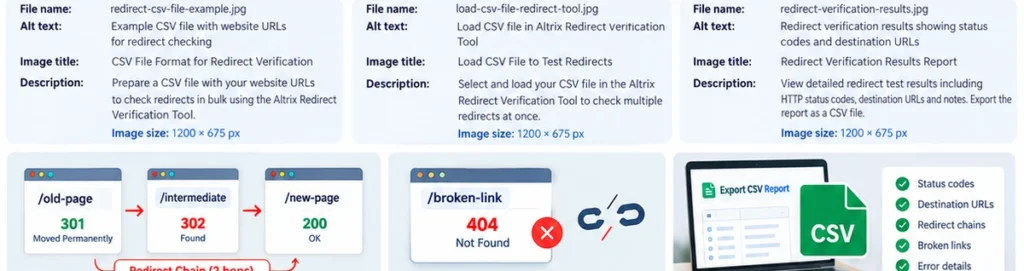
Redirect chains
A redirect chain occurs when one URL redirects through multiple intermediate URLs.
Example:
/old-page → 301 → /temporary-page → 301 → /new-page
The visitor eventually reaches the correct page, but the unnecessary intermediate step adds an extra request.
Google recommends redirecting directly to the final destination whenever possible.
For important website migrations, aim for a straightforward redirect:
/old-page → 301 → /new-page
Avoid adding extra hops when you can update the original redirect rule.
Redirect loops
A redirect loop occurs when redirects repeat without reaching a final destination.
Example:
/page-a → /page-b → /page-a
This prevents visitors and search engines from loading the intended page.
Redirect loops require prompt investigation because they can make content inaccessible.
Broken destinations
A broken redirect may lead to a page returning HTTP 404, 410, or a server error.
For instance:
/old-product → 301 → /new-product
If /new-product returns 404, the redirect rule may be configured correctly but the destination itself is missing.
The solution might involve correcting the destination URL, restoring the replacement page, or selecting a more appropriate destination.
Temporary redirects
A 302 or 307 response may be appropriate for temporary changes.
However, if a product, domain, or page has permanently moved, review whether a permanent redirect should be used instead.
Do not change every temporary redirect blindly. Determine why the original configuration was created.
Step 7: Export Your Results and Fix the Exceptions
Once you have completed the verification, export the report as a CSV file.
A structured report is useful for documenting:
- Tested source URLs.
- Expected destinations.
- Actual final destinations.
- Redirect status codes.
- Redirect chain details.
- Broken pages.
- Incorrect mappings.
- Network errors.
- Items needing developer review.
Use the results to create a remediation list.
For example, group issues into these categories:
Critical: Redirect loops, broken destinations, and important product pages that cannot be reached.
High priority: Incorrect final destinations and permanent migration URLs configured with unintended temporary redirects.
Medium priority: Unnecessary redirect chains and inconsistent canonical URL formatting.
After your developer or website administrator corrects the rules, run the affected URLs through the checker again.
This second verification confirms whether the fixes work in the live environment.
Save both the original and corrected reports as evidence for the migration project.
Common Redirect Testing Mistakes to Avoid
Even experienced website teams can overlook important details when testing redirects in bulk.
Here are six mistakes worth avoiding.
Testing Only the First HTTP Response
A 301 response doesn’t prove that the final destination is valid.
Always follow the complete redirect path and inspect the last URL.
Checking Only the Homepage
A correctly redirected homepage does not mean every product, category, blog post, and landing page has been handled properly.
Check important page-level mappings individually.
Redirecting Unrelated Pages to the Homepage
Sending every deleted product to the homepage may confuse visitors.
Redirect to a relevant replacement where one exists. Otherwise, consider returning an appropriate error status.
Ignoring URL Parameters
Some website URLs contain parameters used for filtering, tracking, or product variations.
Consider whether these parameters should be preserved, removed, or handled through canonicalization.
Forgetting Internal Links
Even when old URLs redirect correctly, internal links should ideally point directly to the new final URLs.
This reduces unnecessary requests and helps keep the site’s navigation clean.
Failing to Retest After Fixing Errors
A successful configuration change in the CMS does not guarantee correct behavior on the live site.
Caching, CDN rules, server redirects, and application settings can all influence the response.
Retest the affected URLs after making changes.
When Should You Test Website Redirects Using CSV?
Bulk testing is useful at multiple points in a website project.
Before migration: Prepare your mapping, check the destination pages, and identify missing replacements.
Immediately after launch: Confirm that the deployed redirects point to the correct destinations.
After fixing redirect issues: Retest failed and incorrect mappings.
During SEO monitoring: Investigate reported crawl issues and unexpected landing-page behavior.
Before client handover: Save the final redirect QA report as part of the project’s delivery documentation.
For large migrations, include redirect verification as a standard launch checklist item rather than treating it as optional cleanup.
How CSV Redirect Testing Supports SEO Migrations
Website migrations involve more than implementing 301 redirects.
They require coordination between SEO specialists, developers, content managers, and site owners.
A properly maintained redirect mapping serves as a shared reference for everyone involved.
Bulk testing supports this process by providing evidence that:
- Important old URLs resolve.
- New URLs are accessible.
- Expected destinations match actual behavior.
- Redirect rules work after deployment.
- Critical migration errors have been documented.
- Developers have clear lists of issues to resolve.
It also makes client handover more transparent.
Instead of simply saying that redirects were configured, an agency can provide a documented verification report showing which URLs were checked and which exceptions were resolved.
However, redirect verification alone does not guarantee the preservation of search rankings.
Google also recommends updating internal links, maintaining suitable redirects, submitting updated XML sitemaps, and monitoring Search Console after a site move.
For complete guidance, see Google Search Central’s website migration documentation.
Manual Redirect Checking vs Bulk CSV Verification
Both methods have their place.
Manual checks are useful when investigating an individual URL, validating an unusual error, or reviewing a specific browser behavior.
Bulk CSV verification becomes more useful when a project involves hundreds of old and new URLs.
| Task | Manual checking | Bulk CSV verification |
|---|---|---|
| Check one redirect | Practical | Practical |
| Check hundreds of URLs | Time-consuming | More efficient |
| Compare expected destinations | Manual recording required | Automated comparison |
| Identify redirect chains | Requires detailed inspection | Chain tracing |
| Organize errors | Manual spreadsheet work | Structured results |
| Create QA documentation | Manual reporting | CSV export |
A strong QA process often uses both approaches.
Run a bulk audit first, then investigate unusual results manually.
Simplify Bulk Redirect Testing With Altrix Redirect Verification Tool
If you regularly handle website migrations, redesigns, or SEO audits, using a dedicated redirect verification tool can save considerable repetitive work.
The Altrix Redirect Verification Tool is designed for checking live redirect behavior against an expected CSV mapping.
Its key capabilities include:
- Verification of up to 500 redirect rows per run.
- CSV import and export.
- Expected versus actual destination comparison.
- Redirect chain and hop-count inspection.
- Permanent and temporary redirect classification.
- Broken destination and HTTP error identification.
- Redirect loop and network error reporting.
- Local operation without uploading your CSV to Altrix Web.
The application is suitable for WordPress, Shopify, WooCommerce, Magento, and custom websites because it checks standard HTTP and HTTPS URLs.
It does not require a connection to your content management system.
The current introductory price is $49 as a one-time purchase for version 1.0.0, with no recurring subscription for that version.
You can review the complete features, technical requirements, and licensing information here:
Explore the Altrix Redirect Verification Tool
Remember that this is a verification and reporting application, not an automatic redirect-repair utility.
Frequently Asked Questions
What is the easiest way to test hundreds of website redirects?
Prepare a CSV file containing source URLs and expected destinations, then use a bulk redirect verification tool to check the live URLs, follow redirect chains, and export the results. This is generally more efficient than testing each URL manually.
Can I test website redirects using CSV without a WordPress plugin?
Yes. A standalone URL verification application can inspect HTTP and HTTPS redirects regardless of whether the website uses WordPress, Shopify, Magento, or another platform.
What columns should my redirect CSV contain?
For Altrix Redirect Verification Tool, use source_url and expected_destination. The application also recognizes common alternatives such as old_url/new_url and from/to.
What is the difference between a 301 and a 302 redirect?
A 301 signals that a resource has moved permanently. A 302 generally indicates a temporary redirect. The correct choice depends on whether the change is intended to be permanent or temporary.
How do I find redirect chains?
Use a checker that follows the complete redirect path and shows intermediate destinations. A redirect chain involves multiple redirect responses before the final URL is reached.
Can redirect errors affect website SEO?
Yes. Incorrect destinations, broken pages, redirect loops, and other migration problems can prevent users and search engines from accessing intended content. However, no tool can guarantee specific search ranking results.
How many redirects can Altrix Redirect Verification Tool check?
Version 1.0.0 supports up to 500 redirect rows in one run. Larger mappings can be split into smaller CSV batches.
Does the Altrix Redirect Verification Tool automatically fix redirects?
No. It identifies and reports problems. Redirect rules must be corrected separately on the website, application, or server, followed by another verification run.
Final Thoughts
Learning to test website redirects using CSV is an important skill for anyone managing website redesigns, e-commerce migrations, domain changes, or technical SEO projects.
A carefully prepared URL mapping gives you a clear migration plan. Bulk verification helps determine whether the live website actually follows that plan.
By checking HTTP status codes, following complete redirect chains, comparing final URLs, and documenting errors, you can identify issues before they become larger website maintenance problems.
For site owners and agencies managing many URLs, the Altrix Redirect Verification Tool provides a practical way to verify redirects and export structured results.
The goal is simple: know where every old URL goes, confirm that the destination is correct, and keep a reliable record of what was tested.