
Free shipping can be a powerful incentive for online shoppers. It simplifies checkout, removes an unexpected expense and can encourage customers to complete their purchases. However, offering WooCommerce free shipping without understanding the true delivery cost can quietly reduce your store’s profit margins.
A customer might spend $75, qualify for free shipping and complete the order successfully. From the customer’s perspective, the offer works perfectly. But what happens when the courier charges $11, packaging costs another $1.50 and other order expenses continue to accumulate?
The important question is not simply whether free shipping increases sales. It is whether those additional sales leave enough money to make the offer sustainable.
In this guide, you’ll learn how to calculate free-shipping expenses, review WooCommerce settings, choose a sensible minimum-order threshold and identify potential shipping-cost shortfalls before they become recurring problems.
We’ll also explain how Altrix Shipping Profit Guard for WooCommerce can help you review supported shipping configurations without automatically changing your live checkout rules.
Table of Contents
What Does WooCommerce Free Shipping Actually Cost?
WooCommerce provides a built-in free-shipping method that allows eligible customers to complete their orders without paying a shipping charge.
However, free shipping for the customer does not mean free delivery for your business.
Your store may still have to pay for:
- Courier or carrier charges
- Packaging materials
- Fulfilment and handling
- Weight-based delivery surcharges
- Delivery-zone differences
- Insurance or additional carrier services
- Returns and reshipments
Some of these expenses are predictable. Others depend on the products ordered, the customer’s location, parcel dimensions and courier arrangements.
For example, shipping a lightweight accessory to a nearby address may cost considerably less than shipping a bulky household item across the country.
If both orders qualify for the same free-shipping promotion, their financial results can be very different.
The central principle is simple: free shipping should be evaluated against the remaining contribution from the order, not merely the total amount the customer spends.
1. Understand How WooCommerce Free Shipping Works
Before calculating profitability, review how your store currently offers free shipping.
WooCommerce includes a free-shipping method that can be configured within individual shipping zones.
To review the settings:
- Open your WordPress administration dashboard.
- Navigate to WooCommerce → Settings → Shipping → Shipping zones.
- Select the shipping zone you want to review.
- Check whether Free Shipping is enabled.
- Open the Free Shipping method settings.
- Review the eligibility requirements and minimum-order amount.
- Save any intentional changes and test them at checkout.
WooCommerce supports several eligibility options, including:
- No requirement
- A valid free-shipping coupon
- A minimum order amount
- A minimum order amount OR a valid coupon
- A minimum order amount AND a valid coupon
These options give store owners flexibility, but they also create important differences in when customers qualify.
Check Whether Coupons Affect Your Free-Shipping Threshold
Suppose your store offers free shipping for orders of $75 or more.
A customer adds $80 worth of products and applies a $15 discount coupon.
The discounted product amount becomes $65.
Depending on your WooCommerce setting for applying the minimum-order rule before coupon discounts, the order may or may not remain eligible for free shipping.
When the option to apply the rule before coupon discounts is enabled, WooCommerce evaluates the amount before the coupon reduction. When it is disabled, the discounted amount is used.
This distinction matters because customers can qualify for a shipping offer based on an order amount that becomes substantially smaller after promotional discounts.
Review this behavior carefully during seasonal sales, coupon campaigns and major promotions.
For the exact configuration options, consult the official WooCommerce Free Shipping documentation.
2. Identify Every Cost Associated With a Free-Shipping Order
A proper WooCommerce shipping cost audit begins with a reliable list of expenses.
The courier invoice is an important component, but it is not necessarily your entire fulfilment cost.
Product acquisition or production cost
This is the amount your business pays to purchase, manufacture or produce the items sold.
For example, a product sold for $75 might have a direct product cost of $35.
You have $40 remaining before paying delivery and other order-related expenses.
Courier or delivery charge
This is the amount charged by your shipping provider.
The cost may depend on:
- Destination and shipping zone
- Package weight
- Volumetric or dimensional weight
- Package dimensions
- Residential or remote-area surcharges
- Service level and delivery speed
- Additional carrier fees
Do not assume that two orders with the same product value will have the same delivery cost.
Packaging and handling
Include the cost of boxes, protective materials, tape, labels and any directly attributable fulfilment supplies.
Even relatively small packaging costs can become significant across hundreds of orders.
Payment processing fees
Payment gateways commonly charge processing fees.
Depending on your provider, those fees may include a percentage of the transaction, a fixed amount or both.
Include the actual applicable fees when reviewing an order’s contribution.
Fulfilment labor
Consider the time and direct labor required to locate, pick, pack, label and dispatch an order.
This is especially important for stores handling products that require special packaging or careful manual preparation.
Returns and replacement expenses
Some businesses must also account for expected returns, failed deliveries, damaged parcels and reshipments.
These costs may not occur on every order, but their historical average can affect the sustainability of a free-shipping policy.
Tip: Use your own store’s financial records rather than generic industry averages whenever possible. Keep all calculation inputs in the same currency and use a consistent treatment of taxes.
3. Calculate Whether Free Shipping Covers Your Costs
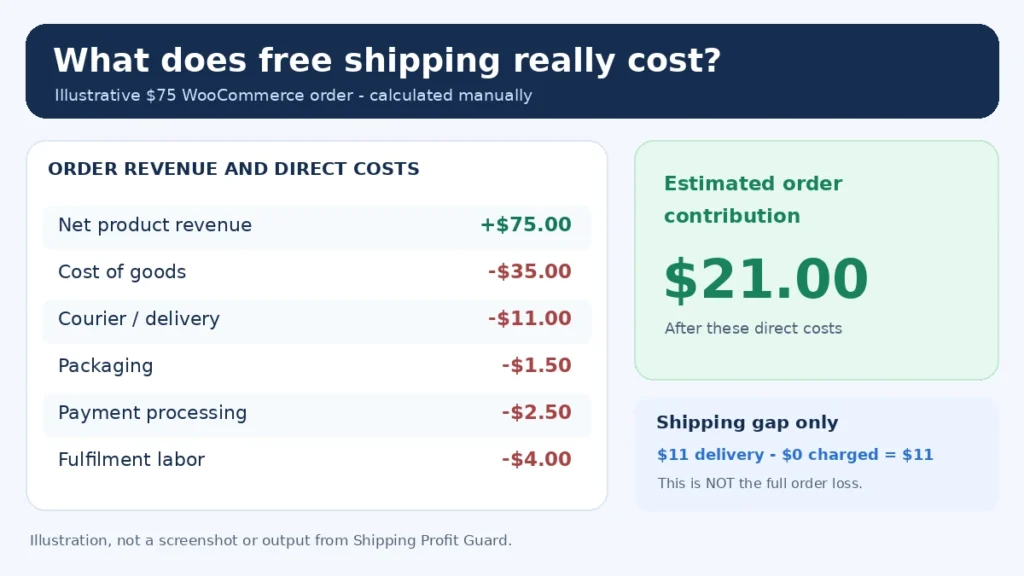
Let’s examine an illustrative WooCommerce order.
A customer purchases products totaling $75 and qualifies for free shipping.
Your business incurs the following direct expenses:
| Order component | Amount |
|---|---|
| Net product revenue, excluding sales tax | $75.00 |
| Product cost | -$35.00 |
| Courier delivery charge | -$11.00 |
| Packaging materials | -$1.50 |
| Payment processing | -$2.50 |
| Fulfilment labor | -$4.00 |
| Remaining order contribution | $21.00 |
The simplified calculation is:
$75 − $35 − $11 − $1.50 − $2.50 − $4 = $21
In this example, the customer pays nothing for shipping, but the store spends $11 on delivery.
Therefore:
Shipping-cost gap = $11 delivery cost − $0 customer shipping charge = $11
The order still contributes $21 after the listed expenses.
This is an important distinction.
An $11 shipping shortfall does not automatically mean the business lost $11 overall, and the $21 remaining is not necessarily net profit.
Advertising costs, refunds, additional fees, fixed operating expenses and other financial items may still need to be considered.
What If the Customer Paid Part of the Shipping Cost?
Suppose the same order collected a $6 shipping charge.
If all other costs remained unchanged, its contribution would increase from $21 to $27.
The business would still be subsidizing $5 of the $11 delivery expense, but it would recover more of that cost from the customer.
This simplified comparison shows why reviewing shipping recovery can be useful even when orders remain profitable.
Not every shipping-cost gap represents an unacceptable result. Some businesses deliberately absorb delivery expenses to support a broader pricing or customer-acquisition strategy.
The key is understanding the cost and making that decision intentionally.
4. Choose a Sensible WooCommerce Free Shipping Threshold
A minimum-order threshold is one of the most common ways to limit free shipping to orders above a certain value.
For example, a store might advertise:
Free shipping on orders over $75.
The intention is often to encourage customers to add more products to their carts.
However, choosing a threshold without reviewing product margins can create problems.
A $75 order containing high-margin accessories may comfortably support delivery costs. A similarly priced order containing heavy or low-margin goods may leave very little contribution.
A Simple Threshold Calculation
One useful starting point is to estimate the minimum product revenue required to cover your expected order costs and desired contribution.
For this simplified example, assume:
- Average product gross margin before shipping: 40%
- Estimated delivery cost: $10
- Packaging: $2
- Fulfilment labor: $4
- Estimated payment processing: $2.50
- Desired remaining contribution: $10
The costs and target contribution total $28.50.
With a 40% product gross margin:
Illustrative threshold = $28.50 ÷ 0.40 = $71.25
Under these assumptions, a free-shipping threshold around $72 or higher may warrant testing.
This is only a starting estimate, not a universal formula.
A percentage-based payment fee, product mix, discounts, taxes, variable shipping costs and changes in order quantity can affect the result.
A practical threshold should be tested against actual orders, not selected solely because competitors use a particular amount.
Test Multiple Thresholds
Consider evaluating several possible values, such as $60, $75 and $90.
For each threshold, examine:
- The number of historical orders that would qualify.
- The average product margin of qualifying orders.
- Expected delivery and fulfilment costs.
- The proportion of heavy or bulky products.
- The effect of discount coupons.
- The remaining order contribution.
A higher threshold may reduce shipping exposure, but it could also discourage some purchases.
The objective is not necessarily to set the highest possible amount. It is to find a sustainable balance between customer appeal and business performance.
5. Audit WooCommerce Shipping Zones and Product Types
WooCommerce shipping zones determine which shipping methods customers can access based on their delivery address.
A store may have different zones for domestic, international or selected regional destinations.
Before making changes to a free-shipping promotion, review the costs associated with each supported delivery region.
For example:
| Delivery scenario | Customer shipping charge | Estimated delivery cost | Shipping-cost gap |
|---|---|---|---|
| Nearby delivery | $0 | $6 | $6 |
| Standard domestic delivery | $0 | $11 | $11 |
| Remote-area delivery | $0 | $19 | $19 |
These amounts are illustrative, not real carrier quotations.
The same free-shipping policy can create significantly different cost exposure depending on the destination.
If your shipping costs vary substantially, consider whether different zone-level rules are appropriate.
Do Shipping Classes Solve the Problem?
WooCommerce shipping classes help organize products into groups such as small parcels, bulky goods or heavy products.
They can be used with supported shipping methods, including Flat Rate, to calculate different shipping charges.
However, assigning a shipping class does not automatically create a separate free-shipping eligibility rule.
If your goal is to exclude specific products from a free-shipping offer or apply conditional rates, you may need additional shipping logic or an appropriate extension.
Always test the resulting checkout behavior.
You can learn more in the WooCommerce Shipping Classes documentation.
6. Check Common Free-Shipping Risk Scenarios
A useful shipping audit should examine more than a single standard product.
Review several realistic scenarios to understand where costs may increase.
Scenario A: Lightweight, low-value products
A small product may have a reasonable selling price but insufficient margin to absorb the fixed cost of delivery.
For example, a $15 product with a $7 courier charge may require a different shipping strategy from a $150 product.
Scenario B: Heavy or bulky products
Heavy products may trigger weight-based charges.
Bulky items can also be charged using dimensional weight, even when their actual physical weight is relatively low.
This makes accurate product dimensions and delivery assumptions particularly important.
Scenario C: Multiple quantities
Shipping costs do not always increase proportionally with product quantity.
Adding several items might require a larger box, a second parcel or a different carrier service.
Test realistic quantities rather than assuming one product and five products have identical fulfilment requirements.
Scenario D: Discounted orders
Promotional coupons can reduce the revenue available to cover delivery expenses.
Test coupon combinations to ensure free-shipping eligibility works as intended.
Scenario E: Unusual delivery locations
Remote regions, islands and other special delivery destinations may have additional charges.
Compare your shipping policy against actual carrier coverage and surcharges.
Scenario F: Mixed-product carts
A cart containing both lightweight and heavy products may behave differently from a single-product order.
Review mixed carts separately, particularly when third-party shipping methods or carrier calculations are involved.
7. Audit Shipping Costs With Altrix Shipping Profit Guard
Manually reviewing every product, shipping class and supported shipping configuration can take time.
This is where a focused diagnostic tool can support the process.
Altrix Shipping Profit Guard for WooCommerce helps store administrators compare supported configured shipping charges against merchant-entered delivery-cost estimates.
It is designed for WooCommerce store owners, developers and agencies that want to identify potential shipping-cost gaps for further investigation.
What the Free Edition Checks
The Free edition supports several practical audit activities:
- Reviewing published simple products and variations.
- Checking supported fixed Flat Rate and shipping-class costs.
- Evaluating supported free-shipping threshold scenarios.
- Comparing configured customer charges with a delivery-cost estimate.
- Highlighting missing or zero shipping weight and dimensions.
- Identifying products that exceed configured weight or size warning thresholds.
This makes it useful as an initial shipping-configuration review.
How to Run a Shipping Review
A typical workflow involves four stages.
Step 1: Enter realistic delivery assumptions.
Start with an estimated delivery cost per parcel and appropriate warning thresholds.
Use actual carrier information where possible.
If a delivery cost is unknown, leave the estimate unknown rather than recording zero. Zero should mean there is genuinely no delivery cost.
Step 2: Choose a shipping zone and product quantity.
Select the scenario to investigate.
The supported audit models one product at the selected quantity as a single parcel within the selected shipping zone.
This is not the same as simulating every possible mixed cart.
Step 3: Run the audit.
Review configured customer charges, modeled delivery estimates, potential shipping shortfalls and product-data warnings.
Investigate entries that indicate significant differences.
Step 4: Verify the findings manually.
Compare flagged results against real carrier prices, product packaging, actual checkout behavior and recorded delivery charges.
Make confirmed corrections through your usual WooCommerce administration process.
When the Pro Edition May Help
The Pro add-on extends the audit with additional cost-modeling and reporting capabilities.
These include:
- Rate-per-billable-kilogram delivery estimates.
- Dimensional-weight calculations using a configurable divisor.
- Handling-cost assumptions.
- Reusable audit profiles by shipping zone and class.
- CSV export of the current product-audit page.
- Comparison of manually entered recorded delivery costs with original shipping charges on supported orders.
These capabilities are useful when a single estimated cost per parcel is not detailed enough.
For example, a business shipping differently sized products may benefit from reviewing both physical and dimensional weight assumptions.
Important: Shipping Profit Guard does not automatically adjust WooCommerce shipping rates, edit orders or guarantee that every shipping extension is simulated. Its modeled shipping shortfalls are not full order-profit calculations.
The Pro add-on is available at an introductory one-time price of $29 and requires the Free edition to remain installed and active.
Explore Altrix Shipping Profit Guard — Free and Pro
8. Improve Your Free-Shipping Strategy Without Removing the Offer
Finding a potential shipping shortfall does not always mean you should stop offering free shipping.
Instead, use the information to refine the policy.
Review your minimum-order amount
Compare qualifying orders with their actual delivery costs and margins.
Increase or reduce the threshold only after reviewing representative order data.
Separate delivery regions where appropriate
A single free-shipping rule may not make financial sense for every destination.
Use relevant shipping zones and supported conditions to create a policy suitable for the areas you serve.
Check bulky and heavy products
Review products that frequently incur higher carrier charges.
Accurate shipping weights, dimensions and shipping classes can support more informed pricing and delivery decisions.
Review promotional coupons
Confirm how free shipping interacts with cart discounts.
Test both discounted and undiscounted orders close to the minimum-order threshold.
Improve your product pricing review
Delivery is only one component of order profitability.
Product costs, low-margin selling prices and promotional discounts should also be reviewed when assessing a shipping promotion.
Monitor real delivery expenses
Estimate shipping costs before making a decision, then compare your assumptions with actual invoices and completed orders.
Carrier agreements, fuel surcharges and packaging practices can change over time.
A review that was accurate six months ago may no longer reflect your current expenses.
9. Common WooCommerce Free-Shipping Mistakes to Avoid
Mistake 1: Assuming every free-shipping order is profitable
A qualifying cart total does not guarantee that sufficient margin remains.
Review product costs and direct order expenses.
Mistake 2: Ignoring packaging and handling
Shipping invoices alone may underestimate total fulfilment expenses.
Mistake 3: Using one delivery estimate for every product
Weight, parcel size and destination can significantly affect delivery costs.
Mistake 4: Forgetting about coupon discounts
A discount may reduce the product revenue available to absorb shipping expenses while free-shipping eligibility remains in place.
Mistake 5: Assuming shipping classes control all free-shipping rules
Shipping classes group products for use by compatible shipping methods. Additional eligibility logic may be needed for complex restrictions.
Mistake 6: Treating an estimated shipping shortfall as net loss
A shipping-cost gap measures the difference between delivery cost and recovered shipping revenue.
It does not represent the complete financial result of the order.
10. Frequently Asked Questions
Is free shipping available in WooCommerce without a plugin?
Yes. WooCommerce includes a built-in Free Shipping method.
You can add it to a shipping zone and configure eligibility using supported minimum-order and coupon requirements.
How do I set free shipping above a minimum order value?
Go to WooCommerce → Settings → Shipping → Shipping zones, edit the relevant zone and configure its Free Shipping method.
Choose the minimum-order requirement, enter your threshold and test the result.
Does a free-shipping coupon override the minimum-order amount?
That depends on how you configure the Free Shipping method.
WooCommerce supports minimum-order and coupon combinations using AND or OR requirements. Review the selected condition before using coupons in a promotion.
Can WooCommerce offer free shipping for only certain products?
Core WooCommerce supports shipping zones and general free-shipping eligibility rules.
Product-specific conditional free-shipping arrangements may require additional configuration, an appropriate extension or custom development.
Does free shipping always reduce profit?
Not necessarily.
Free shipping creates a delivery expense that must be funded by the business, but it may also influence conversion rates, order values and customer behavior.
Its financial value depends on both the direct cost and the additional contribution generated by the offer.
What is a WooCommerce shipping-cost shortfall?
A shipping-cost shortfall occurs when delivery costs exceed the shipping amount recovered from the customer.
For example, if the customer pays $0 for shipping and the estimated delivery expense is $11, the shipping-cost gap is $11.
That does not necessarily mean the whole order is unprofitable.
Can Shipping Profit Guard automatically fix my shipping rates?
No.
Altrix Shipping Profit Guard is a read-only audit tool. It helps identify supported scenarios that may require attention.
Store administrators remain responsible for validating findings and making changes in WooCommerce.
Can Shipping Profit Guard calculate my total order profit?
No.
The plugin focuses on shipping-cost comparisons using configured assumptions and supported shipping charges.
A complete profit calculation requires product costs, relevant fees, discounts, returns and other expenses. Use a dedicated financial calculation or reporting process for that analysis.
11. Practical WooCommerce Free-Shipping Audit Checklist
Before launching or revising a free-shipping promotion, use this checklist:
- Review the minimum-order threshold.
- Verify applicable shipping zones.
- Test coupon eligibility before and after discounts.
- Check actual courier prices.
- Include packaging and handling costs.
- Review heavy and oversized products.
- Check shipping weights and dimensions.
- Test different cart quantities.
- Review mixed-product orders.
- Compare shipping costs with customer shipping charges.
- Calculate remaining order contribution separately.
- Verify checkout behavior before publishing changes.
- Review completed orders and actual carrier invoices regularly.
This process helps turn free shipping from a general promotional decision into a policy supported by better cost information.
Conclusion: Make WooCommerce Free Shipping a Calculated Decision
WooCommerce free shipping can be useful for improving the customer experience and supporting sales, but it should not be configured without understanding its cost.
The most effective approach is to review real delivery expenses, calculate the remaining contribution from qualifying orders, test different minimum-order thresholds and regularly check for unexpected shipping-cost gaps.
A store does not need to recover every dollar of delivery expense directly from the customer. But it should understand how much it is absorbing and why.
For businesses managing many WooCommerce products, Altrix Shipping Profit Guard offers a practical way to review supported shipping settings, cost assumptions and potential shortfalls without changing live checkout rules.
Start with the free version, verify its findings against your actual delivery records and consider the Pro edition if your audit requires more detailed cost models or exportable reports.
Review Your WooCommerce Shipping Costs With Altrix Shipping Profit Guard