
A website migration is an opportunity to improve performance, usability, design, and business growth. However, even a carefully planned migration can create unexpected SEO problems. Missing redirects, broken internal links, incorrect canonical tags, and indexing restrictions can prevent customers and search engines from finding important pages.
That is why following a website migration SEO checklist after launch is essential.
Whether you are moving from Magento to Shopify, redesigning a WordPress website, changing domains, restructuring WooCommerce URLs, or upgrading your hosting environment, a successful launch involves more than making the new website visible.
You must verify that search engines can discover your new pages, existing visitors reach the correct destinations, and essential business functions continue working.
This practical website migration SEO checklist covers 15 important checks, explains common migration mistakes, and demonstrates how to validate redirects efficiently using a dedicated verification tool.
Table of Contents
What Is a Website Migration SEO Checklist?
A website migration SEO checklist is a structured series of technical, content, and performance checks used to confirm that a website continues functioning correctly after a significant change.
Different migration projects introduce different risks.
For example:
- Domain migration: Moving from an old domain to a new one.
- Platform migration: Moving from Magento to Shopify or another e-commerce platform.
- Website redesign: Introducing new templates, navigation, content, or URL structures.
- HTTP to HTTPS migration: Moving insecure URLs to secure HTTPS versions.
- URL restructuring: Changing product, category, or article permalinks.
- Hosting migration: Moving the website to a different infrastructure provider.
A hosting-only migration with unchanged public URLs may not require a redirect map. However, it still requires technical validation, monitoring, and checks for unexpected crawling or performance problems.
The primary objective is to preserve useful content, maintain access to important URLs, reduce avoidable search visibility losses, and provide a reliable customer experience.
Why Post-Launch SEO Verification Matters
Search engines develop an understanding of a website through its content, URLs, internal links, canonical signals, and technical configuration.
When a migration changes those elements, search engines must discover and evaluate the updated website.
Temporary ranking fluctuations can occur even after a well-managed migration. However, avoidable implementation errors can make the situation considerably worse.
Typical post-migration problems include:
- Old product URLs returning 404 errors.
- Permanent redirects pointing to unrelated pages.
- Redirect chains creating unnecessary delays.
- New pages retaining staging-site
noindexinstructions. - Internal links referencing retired URLs.
- Canonical tags identifying the wrong website.
- XML sitemaps containing outdated links.
- Missing product descriptions, metadata, or structured data.
- Analytics and conversion tracking no longer recording correctly.
A detailed website migration SEO checklist helps teams identify these problems before they affect more customers.
Website Migration SEO Checklist: 15 Essential Verification Steps
1. Verify All Important 301 Redirects
Redirect verification should be among your first post-launch tasks when public URLs have changed.
A 301 redirect indicates that a page has permanently moved to another address. An HTTP 308 redirect also represents a permanent redirect.
For permanent site moves, server-side permanent redirects are generally preferable.
Consider this example:
Old URL:
New URL:
The old URL should redirect directly to the correct replacement page when the content has genuinely moved.
However, checking only whether the old URL returns HTTP 301 is not sufficient.
You should also confirm:
- The final destination matches the approved migration map.
- The destination loads successfully.
- The destination represents the same or substantially equivalent content.
- The redirect does not create a loop.
- The redirect does not introduce unnecessary intermediate steps.
- Important query-string behavior is handled appropriately.
A redirect that technically works but sends a product page to an unrelated category can still create a poor experience.
Best practice: Maintain a spreadsheet containing the original URL and its expected destination. Test the actual response against that mapping after launch.
2. Identify Redirect Chains and Loops
A redirect chain occurs when one URL redirects through multiple intermediate addresses before reaching its final destination.
For example:
/old-product → /temporary-product → /new-product
Although the visitor may eventually reach the intended page, each additional redirect creates another request and can increase loading time.
A redirect loop is more serious because the browser repeatedly follows redirects without reaching a successful destination.
For example:
/page-a → /page-b → /page-a
Your post-launch checks should identify both problems.
For permanent moves, update redirect rules so that old URLs point directly to their intended final destinations wherever practical.
Avoid adding new redirects on top of old rules without reviewing the complete destination path.
How to Verify Redirects in Bulk
Checking hundreds of URLs manually is time-consuming.
The Altrix Redirect Verification Tool provides a structured approach to comparing expected redirect mappings against live website behavior.
The standalone tool allows you to:
- Import a CSV containing source URLs and expected destinations.
- Test up to 500 redirect rows in one run.
- Inspect complete redirect chains.
- Identify incorrect final destinations.
- Detect broken responses and redirect loops.
- Export results for review and remediation.
The software runs locally and does not require a WordPress or Shopify connection. Its current introductory price is $49 for a one-time purchase.
Importantly, it is a verification tool: it reports problems rather than changing server redirects automatically.
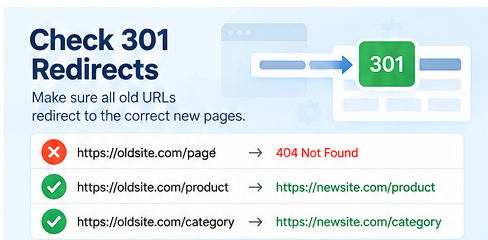
For developers, migration agencies, and store owners, a structured redirect report provides useful evidence that the migration has been tested rather than simply launched.
3. Check Broken URLs and 404 Errors
A 404 status indicates that the requested page was not found.
Some 404 responses are normal. For example, a page that was intentionally removed without a replacement may appropriately return 404 or 410.
The problem arises when important existing pages unexpectedly disappear.
Start by checking:
- Former homepage URLs.
- High-traffic blog posts.
- Popular product pages.
- Product categories.
- Landing pages used in advertising.
- URLs receiving external backlinks.
- Pages previously generating leads or sales.
Prioritize URLs that had meaningful traffic or conversions before the migration.
If a page has a genuine replacement, configure an appropriate permanent redirect.
If the content has been permanently removed and no suitable replacement exists, returning 404 or 410 may be more appropriate than redirecting every retired URL to the homepage.
Also review Google Search Console for newly reported indexing and crawling problems.
4. Verify Google Search Console Configuration
Google Search Console is essential for monitoring search visibility after a migration.
Open Google Search Console and confirm that the relevant website property is verified.
For a domain change, ensure you can access the appropriate old and new properties.
When the migration qualifies as a domain or subdomain move, use Google’s Change of Address tool where applicable.
This feature is not required for every migration. For example, changing page paths within the same domain is different from moving to an entirely new domain.
After verification:
- Open the Page indexing report.
- Review discovered and indexed pages.
- Investigate unexpected exclusions or errors.
- Inspect important new URLs.
- Review search impressions and clicks over time.
Do not assume that every excluded URL is a problem. Duplicate URLs, intentionally redirected pages, and intentionally non-indexable content may be excluded correctly.
Focus first on important pages that should appear in search results.
5. Submit and Validate the XML Sitemap
An XML sitemap helps search engines discover important URLs.
Following a migration, the sitemap should reflect the new website structure.
Review whether it contains:
- Correct HTTPS URLs.
- Preferred domain and hostname versions.
- Current product and category URLs.
- Published blog posts.
- Important service pages.
- Canonical, indexable destinations.
Remove outdated or unintended URLs from the new sitemap.
For example, a Shopify or WooCommerce migration should not leave hundreds of obsolete product addresses in the new sitemap when those pages have moved.
Submit the relevant sitemap or sitemap index in Google Search Console.
Remember that sitemap submission does not guarantee indexing. Google still evaluates each URL independently.
For additional guidance, consult Google’s official XML sitemap documentation.
6. Confirm Canonical Tags Are Correct
Canonical tags help search engines understand which URL you prefer for duplicate or substantially similar content.
An incorrect canonical tag can undermine an otherwise successful migration.
For example, imagine the new product page is:
But its canonical tag still references:
This creates conflicting signals.
After migration, verify that important new pages reference the appropriate preferred canonical URL.
Pay particular attention to:
- Product variants.
- Filtered category URLs.
- Pagination and duplicate-content scenarios.
- HTTP and HTTPS versions.
- www and non-www versions.
- Pages copied from staging environments.
Canonical tags are signals rather than commands, and Google may select a different canonical when other evidence suggests another URL is preferable.
Use Search Console’s URL Inspection tool to examine the Google-selected canonical for important pages.
7. Check Robots.txt and Noindex Restrictions
During development, websites are sometimes blocked from search engines to prevent staging pages from appearing in search results.
These restrictions must be reviewed before and after launch.
Common problems include:
- A sitewide
Disallow: /directive left in robots.txt. - A
noindexmeta tag copied from staging. - An
X-Robots-Tagheader unintentionally preventing indexing. - Important product or service directories being blocked.
These settings serve different purposes. Blocking crawling in robots.txt is not the same as applying noindex.
Review the exact URLs that should be accessible to search engines.
Keep intentional restrictions for private, administrative, or low-value content, but remove accidental restrictions affecting public pages.
8. Audit Internal Links and Navigation
Internal links help visitors and search engines discover relevant pages.
After a migration, old URLs sometimes remain embedded in:
- Main navigation menus.
- Footer menus.
- Product descriptions.
- Blog articles.
- Breadcrumbs.
- Related-product sections.
- Homepage promotional banners.
Although redirects may handle some outdated links, internal links should ideally point directly to the final destination.
This reduces unnecessary requests and provides a clearer website structure.
Check both desktop and mobile navigation.
Make sure important products, categories, and services are accessible without relying on outdated navigation paths.
For an e-commerce store, inspect product recommendations, category filters, and cart-related navigation particularly carefully.
9. Compare Important Page Content and Metadata
Website migrations can unintentionally remove content that previously supported organic search visibility.
Compare important old and new pages, including:
- SEO titles.
- Meta descriptions.
- Main headings.
- Product descriptions.
- Category introductions.
- FAQ sections.
- Image alt text.
- Internal links.
- Downloadable resources.
A new design should not automatically result in replacing useful product descriptions with short promotional text.
Preserve important information that serves users, even when reorganizing the presentation.
For example, a successful product migration should maintain essential specifications, supported options, sizing information, and clear descriptions.
If the redesign substantially changes content, document those changes so you can distinguish migration-related technical problems from content-related search performance changes.
10. Validate Structured Data
Structured data provides search engines with machine-readable information about eligible content.
Depending on your website, this may include:
- Product details.
- Breadcrumbs.
- Organization information.
- Articles.
- Product offers and availability.
During a platform migration, structured data can disappear or become inconsistent.
For example, a product page may display a price of $49 while its structured data still contains an old value.
Use Google’s Rich Results Test to inspect important pages.
Check that structured data matches visible content and does not claim unavailable products, incorrect prices, or unsupported attributes.
Valid structured data does not guarantee enhanced search results, but implementation errors are worth fixing.
11. Check Website Speed and Core Web Vitals
A redesigned website may look attractive but perform worse than the previous version.
Large images, unnecessary scripts, unoptimized themes, and excessive third-party integrations can increase loading time.
Review performance using Google PageSpeed Insights.
Pay attention to:
- Largest Contentful Paint (LCP).
- Interaction to Next Paint (INP).
- Cumulative Layout Shift (CLS).
- Mobile responsiveness.
- Image compression and formats.
- JavaScript execution.
- Server response performance.
Compare performance before and after migration where historical data is available.
Do not focus exclusively on achieving a perfect laboratory score. Prioritize actual user experience, important templates, and persistent performance problems.
12. Verify Forms, Checkout and Conversion Tracking
SEO traffic has limited commercial value if customers cannot complete the intended action.
A migration should therefore include functional and conversion testing.
For business websites, test:
- Contact forms.
- Quote request forms.
- Email notifications.
- Telephone links.
- WhatsApp buttons.
- Appointment booking.
For e-commerce stores, also verify:
- Add-to-cart functionality.
- Product variations.
- Discounts and coupon codes.
- Shipping options.
- Payment methods.
- Order confirmation pages.
- Transactional emails.
Next, confirm Google Analytics 4 and relevant conversion events are functioning correctly.
Check whether leads, purchases, or other important actions are being recorded and whether events fire only when the corresponding action actually occurs.
Conversion testing helps distinguish an SEO problem from a broken purchase journey.
13. Review Product and Category URL Mappings
Product and category URLs often require extra attention during Shopify, Magento, and WooCommerce migrations.
Different platforms may generate very different URL structures.
A former product address might use:
/catalog/product/view/id/123
while the new store uses:
/products/product-name
Your migration map should pair the old product with the corresponding new product whenever it exists.
Also check:
- Products moved to different categories.
- Products with changed names.
- Discontinued products.
- Product variants.
- Category and collection pages.
- Pagination and filter URLs.
Avoid sending every retired product to a generic homepage.
Correct mapping should consider user intent, replacement suitability, and the new site’s information architecture.
For large catalogs, combine spreadsheet comparison with redirect verification and manual checks on important pages.
14. Monitor Search Traffic and Rankings
SEO migration verification continues after the launch day.
Open Google Search Console and monitor the Performance report.
Compare:
- Organic clicks.
- Search impressions.
- Queries.
- Landing pages.
- Geographic performance.
- Average position trends.
Review Google Analytics 4 to understand organic sessions, engagement, and conversions.
Google Search Console and GA4 measure different stages of the visitor journey, so their figures will not match exactly.
Temporary visibility changes can occur during a migration. Larger websites may require more time for search engines to discover and process new URLs.
However, persistent or severe traffic losses should trigger a structured investigation.
Start by identifying whether the decline affects the entire site or particular sections.
If only one product category has lost traffic, review that category’s redirects, content, canonical signals, indexing, and internal links before changing unrelated pages.
15. Prepare a Post-Migration SEO Audit Report
The final step in your website migration SEO checklist is documentation.
A clear audit report helps developers, project managers, store owners, and clients understand what was checked and what still needs attention.
Include the following details:
| Audit area | What to record |
|---|---|
| Redirect mapping | Source URL, expected destination, actual destination |
| Response validation | HTTP status, final status, redirect hops |
| Indexing | Important URLs, indexing observations and errors |
| Metadata | Missing or incorrect titles, descriptions and headings |
| Canonical signals | Expected and observed canonical URLs |
| Internal links | Broken links and outdated destinations |
| Performance | Important speed and user-experience observations |
| Analytics | Conversion-event and tracking checks |
| Remediation | Issue severity, responsible person and resolution status |
A useful report distinguishes critical problems from lower-priority improvements.
For instance, a high-value product page accidentally marked noindex needs immediate attention, while a minor image-alt-text improvement can usually be scheduled later.
The report should include a follow-up date and evidence of completed fixes.
How to Use Altrix Redirect Verification Tool After Migration
The Altrix Redirect Verification Tool helps simplify the redirect-specific portion of a website migration SEO audit.
It supports a practical four-step workflow.
Step 1: Prepare your CSV
Create a spreadsheet containing:
source_url,expected_destination
For example:
https://oldsite.example/old-page,https://newsite.example/new-page
Step 2: Import the redirect map
Load the CSV into the local application. Adjust available URL comparison and timeout options to match your project requirements.
Step 3: Run the verification
The software checks live redirects and compares their final destinations against the expected URLs.
Review failed checks, temporary redirects, loops, server errors, and incorrect destination mappings.
Step 4: Export your findings
Save the CSV report and use it to correct redirect rules, communicate issues to developers, or document the migration for a client.
The application supports up to 500 redirects per run in its current version. It requires Node.js 20 or later and is available with Windows, macOS, and Linux launchers.
Explore Altrix Redirect Verification Tool — $49 One-Time Purchase
This tool complements an SEO migration audit. It does not replace Search Console, full-site crawling, content comparison, or manual conversion testing.
Recommended Website Migration Monitoring Schedule
A successful migration should be monitored over time rather than assessed only once.
| Period | Recommended checks |
|---|---|
| Launch day | Redirects, critical pages, indexing directives, forms, checkout |
| First 48 hours | Server errors, sitemap, Search Console, analytics |
| First week | Broken links, canonical signals, product URLs, important queries |
| Weeks 2–4 | Search impressions, clicks, indexing and conversion trends |
| Months 2–3 | Remaining redirect problems, organic landing-page performance and unresolved issues |
This schedule is a practical starting point rather than a fixed requirement. High-traffic stores and major domain migrations may require more frequent monitoring.
For permanent URL moves, retain redirects for as long as practical. Google generally recommends maintaining them for at least a year, and longer retention may benefit people using old bookmarks and external links.
Common Website Migration SEO Mistakes to Avoid
Many post-migration problems share a few recurring causes.
Redirecting every old URL to the homepage: This can frustrate users and fail to provide a meaningful replacement for the original content.
Ignoring old product and category URLs: These may have external backlinks, rankings, and direct customer visits.
Failing to remove staging restrictions: Public pages can remain blocked from indexing after launch.
Changing content, design, domain, and platform without documenting the differences: This makes troubleshooting more difficult.
Assuming a 301 response proves success: The redirect must also reach the intended destination.
Neglecting checkout and lead forms: Organic visitors may arrive successfully but fail to convert.
Stopping monitoring immediately after launch: Search engines need time to discover changes, and some issues appear only later.
The most effective approach is to test systematically, preserve evidence, and resolve high-impact errors first.
Frequently Asked Questions
What is the most important part of a website migration SEO checklist?
For migrations involving changed URLs, correct permanent redirects and accessible destination pages are among the most important checks. Indexing configuration, canonical signals, internal links, and site functionality also deserve immediate attention.
How long does SEO recovery take after website migration?
There is no guaranteed recovery period. Small migrations may settle relatively quickly, while large domain or platform migrations can take weeks or longer. The outcome depends on factors such as URL changes, content changes, crawlability, server performance, and existing search visibility.
Should I use 301 or 302 redirects during a migration?
Use permanent redirects, such as 301 or 308, when pages have permanently moved. Temporary redirects, such as 302, are appropriate for genuinely temporary changes.
Can I check hundreds of redirects automatically?
Yes. A bulk redirect verification tool can compare expected destinations against actual live redirect behavior. The Altrix Redirect Verification Tool supports up to 500 rows per run and can export a structured verification report.
Do I need to submit my sitemap after migration?
Submitting an updated sitemap in Google Search Console is recommended when the sitemap changes. It helps Google discover the current URLs, although it does not guarantee indexing.
Can a website migration permanently affect SEO rankings?
A poorly executed migration can cause prolonged visibility problems, particularly when important pages become inaccessible or lose their content and search signals. Careful planning, redirect mapping, technical verification, and monitoring reduce avoidable risk.
Is Google Search Console enough for migration testing?
No. Search Console is valuable for monitoring Google’s crawling, indexing, and search performance data, but it does not replace redirect-map testing, functional checks, server monitoring, and content audits.
Final Thoughts: Protect Your Website After Launch
A website migration is not complete when the new design goes live. It is complete only after important URLs, content, technical signals, customer journeys, and business outcomes have been reviewed.
By following this website migration SEO checklist, you can identify broken redirects, resolve indexing restrictions, verify metadata, inspect important pages, and monitor whether the new website continues serving customers effectively.
The most valuable approach combines accurate URL mapping, technical verification, Google Search Console monitoring, and ongoing improvements.
If you manage a large migration, don’t rely on manual checks alone.
Use the Altrix Redirect Verification Tool to inspect redirect mappings and generate a structured report.
For broader migration assistance, including WordPress, Shopify, WooCommerce, technical SEO, and website redesigns, explore Altrix Web’s SEO and development services.
A carefully verified migration creates a stronger foundation for future growth—and helps ensure that the work invested in your website continues delivering value.