
Website redirects are essential when you redesign a website, change domain names, restructure URLs or migrate an online store. A correctly configured redirect helps visitors and search engines reach the appropriate new page without encountering an unnecessary error.
However, redirects can also create hidden technical SEO problems. Redirect chains, redirect loops and broken destination URLs can interrupt navigation, increase loading time and prevent search engines from reaching important content efficiently.
For example, imagine moving an online store from an older platform to Shopify. You create 301 redirects for your previous product URLs, but some redirects pass through multiple intermediate pages. Others lead to deleted products, while a few point back to their original URLs.
A simple check showing a 301 response might suggest everything is working, even when the final destination is incorrect.
This guide explains how to find redirect chains, identify redirect loops, detect broken destination URLs and fix seven common redirect problems. You’ll also learn how to verify hundreds of redirects using a CSV-based workflow.
Table of Contents
What Are Redirect Chains?
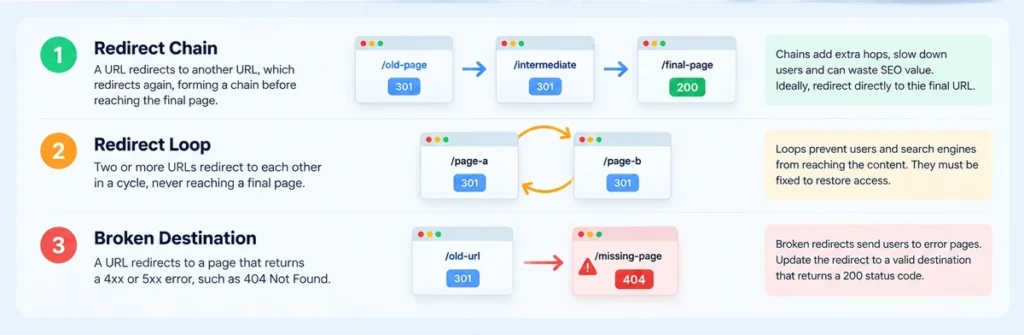
A redirect chain occurs when one URL redirects to another URL, which then redirects again before reaching the final destination.
Consider this example:
↓
301 Moved Permanently
↓
301 Moved Permanently
↓
200 OK
The visitor eventually reaches the correct product page, but the browser must follow two redirects instead of one.
A more efficient configuration is:
↓
301 Moved Permanently
This removes the unnecessary intermediate redirect.
Redirect chains commonly develop after repeated website redesigns, platform migrations, URL changes and updates to category structures.
Why Are Redirect Chains Bad for SEO?
Redirect chains can create several problems:
- Additional loading time: Each redirect introduces another request before the final page loads.
- Less efficient crawling: Search engine crawlers must follow additional URLs to discover the final destination.
- Unexpected destinations: Intermediate rules might send visitors somewhere other than the intended page.
- Difficult troubleshooting: Long chains make it harder to identify which redirect rule is responsible for a problem.
- Migration complications: Old redirect rules can conflict with newly implemented URL mappings.
Google recommends minimizing redirect chains and directing visitors to the final destination whenever possible.
Importantly, a 301 redirect does not automatically cause a loss of Google PageRank. The problem with unnecessary redirect chains is primarily additional latency, complexity and possible crawl failures—not a fixed percentage of SEO value lost at every redirect.
What Is a Redirect Loop?
A redirect loop occurs when two or more URLs redirect to one another without reaching a final destination.
For example:
↓
301 Redirect
↓
301 Redirect
The browser repeatedly follows redirects until it detects the problem or reaches its redirect limit.
Visitors may see an error such as:
ERR_TOO_MANY_REDIRECTS
Because the requested content is never reached, a redirect loop can make an important landing page inaccessible.
Common Causes of Redirect Loops
Redirect loops can occur when:
- HTTP-to-HTTPS rules conflict with another HTTPS configuration.
- www-to-non-www rules contradict each other.
- WordPress redirect plugins contain overlapping rules.
- Cloudflare or another reverse proxy has incompatible SSL settings.
- Multiple migration rules point URLs back to earlier locations.
- Canonical URL settings conflict with server-level redirects.
For example, a WordPress site configured to force HTTPS while a proxy forwards requests back to HTTP can create a repeated redirect cycle.
The proper solution is to inspect the complete request path and determine which configuration is generating each redirect.
What Are Broken Destination URLs?
A broken destination URL occurs when a redirect leads to a page that is unavailable or returns an error response.
For example:
↓
301 Redirect
↓
404 Not Found
Although the initial URL returns a valid 301 response, its final destination is broken.
This is why checking only the first HTTP status code is insufficient.
Common HTTP Errors to Identify
| HTTP status | Meaning | Recommended action |
|---|---|---|
| 301 | Permanent redirect | Verify the final destination |
| 302 | Temporary redirect | Confirm that the redirect is intentionally temporary |
| 308 | Permanent redirect | Verify the target and intended request behavior |
| 404 | Page not found | Find an appropriate replacement or confirm removal |
| 410 | Content permanently gone | Confirm deliberate removal |
| 500 | Internal server error | Investigate application or server errors |
| 503 | Service unavailable | Check whether the outage or maintenance is temporary |
An intentionally removed page may legitimately return 404 or 410. You should not redirect every deleted page to the homepage merely to eliminate errors.
When a meaningful replacement exists, redirect the old URL to that relevant destination.
How to Find Redirect Chains, Loops and Broken URLs: 7 Practical Fixes
The following process helps you discover redirect issues systematically and determine which problems deserve attention first.
1. Create a List of URLs to Verify
Start by collecting the URLs affected by your website’s changes.
Typical sources include:
- Previous XML sitemaps
- Website migration spreadsheets
- Existing redirect configuration files
- Google Search Console reports
- WordPress export files
- Shopify product and collection exports
- Historical internal links
- URLs from important backlinks
- High-traffic landing pages
Create a spreadsheet containing the original URL and its expected new destination.
For example:
| Old URL | Expected destination |
|---|---|
| example.com/old-product | example.com/products/new-product |
| example.com/old-category | example.com/collections/new-category |
| example.com/old-guide | example.com/blogs/guides/new-guide |
This URL mapping becomes your reference for identifying incorrect redirects.
Without an expected destination, you may discover that a redirect reaches a working page but still be unable to tell whether it reaches the right page.
For an e-commerce migration, preserving product and category relevance is especially important.
2. Check Each URL’s Full Redirect Path
Next, inspect what actually happens when the original URL is requested.
For quick manual checks, you can use command-line tools such as cURL.
To inspect response headers:
curl -I https://example.com/old-pageTo follow redirects and display response headers:
curl -L -I https://example.com/old-pageThe -L option tells cURL to follow redirects. The -I option requests headers rather than the complete response body.
Inspect the HTTP status codes and Location headers to understand the redirect path.
For websites that respond differently to HEAD requests, perform a normal GET request or verify the result using a browser.
You should record:
- Original URL
- Every intermediate URL
- Response status at each step
- Number of redirect hops
- Final destination
- Final response status
This information helps you distinguish successful redirects from chains, loops and broken destinations.
3. Fix Unnecessary Redirect Chains
After identifying redirect chains, inspect whether intermediate URLs are required.
Suppose a product URL follows this path:
/product-old → /product-2024 → /product-2025 → /product-new
If /product-new is the correct permanent destination, update the original redirect rule so /product-old points directly to /product-new.
For Apache servers, a straightforward redirect might look like:
Redirect 301 /product-old /product-newThis is an illustrative example. Actual configuration depends on the server and any existing rewrite rules.
Before changing the configuration, check for conflicting rules in .htaccess, CMS plugins, server settings and CDN services.
After updating the redirect, test the URL again.
The desired result is:
Old URL → 301 → Final URL → 200 OK
Do not remove a redirect simply because it is old. You may still need it for visitors, bookmarks or incoming backlinks.
Instead, update the destination and eliminate unnecessary intermediate hops where practical.
4. Identify and Repair Redirect Loops
Redirect loops require special attention because visitors might be unable to access the requested content.
Start by identifying the sequence of URLs involved in the loop.
For example:
↓
↓
This pattern suggests conflicting www and non-www rules.
Check:
- Your preferred domain setting.
- WordPress Address and Site Address, if applicable.
- Web server redirect rules.
- Reverse proxy or CDN settings.
- HTTPS enforcement settings.
- Redirect plugin configurations.
Choose one consistent canonical hostname and HTTPS configuration.
For example, if the preferred destination is https://example.com/page, ensure other supported versions redirect toward it rather than returning to an earlier version.
Where multiple redirect systems are involved, make one controlled change at a time.
Finally, clear any relevant caches and test the result again.
The objective is to ensure that each starting URL reaches a valid destination instead of returning to a previously visited URL.
5. Repair Broken Destination URLs
A redirect that ends in a 404 or 500 response does not provide the intended destination experience.
Review each broken destination and decide the appropriate response.
If the content has moved: Update the redirect to point to the new, relevant URL.
If the destination contains a typo: Correct the URL in the redirect rule.
If the destination should exist: Repair or restore the destination page.
If the content has permanently disappeared without a relevant replacement: Allow an appropriate 404 or 410 response rather than redirecting users to unrelated content.
If the server returns 5xx errors: Investigate application, hosting or infrastructure problems.
For online stores, always check whether retired product URLs have suitable replacements.
A discontinued product might redirect to an equivalent replacement product or an appropriate category, provided that destination genuinely satisfies the visitor’s original intent.
Avoid blanket redirects that send hundreds of unrelated product URLs to the homepage.
These can create confusing user experiences and may be interpreted as soft 404 situations.
6. Compare Expected and Actual Redirect Destinations
One of the most overlooked website migration problems is an incorrect final destination.
Consider a store migration with this planned mapping:
Expected: /collections/winter-jackets
Actual: /collections/summer-clothing
Both pages might return HTTP 200.
A status-code-only check would see a successful response, yet visitors reach the wrong category.
To find these errors, compare the expected final URL from your migration spreadsheet with the actual URL returned by the redirect sequence.
Check for:
- Incorrect product mappings
- Redirects to unrelated categories
- Unexpected homepage redirects
- Missing URL paths
- Wrong domain or subdomain
- Unwanted query parameter changes
- Incorrect trailing slash behavior
Remember that URL normalization should reflect the intended rules of the website.
Two URLs that look nearly identical may behave differently when query strings, case sensitivity or application routing are involved.
This comparison is particularly valuable during WooCommerce-to-Shopify, Magento-to-Shopify and domain migration projects.
7. Recheck Redirects After Fixing Them
Redirect verification should not end when you update the rules.
Recheck each affected URL and confirm:
- The initial request returns the intended redirect status.
- No redirect loop remains.
- Unnecessary intermediate hops are removed.
- The final URL matches the expected destination.
- The destination responds successfully.
- Important internal links point directly to the current URLs.
- The XML sitemap contains the preferred live URLs.
Keep a record of the original problem, corrective action and verification result.
For client projects, a redirect verification report can become part of the technical SEO handover documentation.
How to Check Hundreds of Redirects Using a CSV File
Manually reviewing a handful of URLs is manageable.
However, checking hundreds of product URLs after an e-commerce migration is repetitive and increases the risk of overlooking errors.
A CSV-based redirect verification workflow helps organize this process.
Prepare the Redirect Mapping File
Use a spreadsheet with two columns:
source_url,expected_destination
https://example.com/old-a,https://example.com/new-a
https://example.com/old-b,https://example.com/new-b
https://example.com/old-c,https://example.com/new-c
Every row describes the expected relationship between an old URL and its destination.
Save the spreadsheet as a UTF-8 CSV file where possible.
Before checking redirects, review the CSV for malformed URLs, blank destinations, duplicate mappings and incorrect domains.
Verify Redirects with the Altrix Redirect Verification Tool
The Altrix Redirect Verification Tool is a standalone application designed to compare expected redirect destinations with live website behavior.
It supports:
- CSV import with
source_urlandexpected_destinationcolumns - Verification of up to 500 redirect rows per run
- Full redirect-chain inspection, up to 10 hops per URL
- Detection of redirect loops
- Identification of 4xx and 5xx destination responses
- Comparison of expected and actual final URLs
- Classification of permanent and temporary redirects
- Exportable CSV reports for review and documentation
The application runs locally on Windows, macOS and Linux with Node.js 20 or later. It uses a modern browser interface and does not require WordPress or Shopify integration.
Your redirect mapping file stays on your computer, although the tool makes HTTP requests to the URLs being checked.
Understanding Redirect Verification Results
The application groups outcomes into practical statuses.
Passed: A permanent redirect reaches the expected destination.
Warning: The destination matches, but a temporary redirect or missing redirect may require attention.
Incorrect: The actual final destination differs from the expected URL.
Broken: The final destination returns a 4xx or 5xx response.
Error: A network, DNS, TLS, timeout or redirect-loop issue prevents normal verification.
Use the exported report to prioritize repairs.
Start with redirect loops, broken destination URLs and incorrect mappings affecting important landing pages or products.
Then address unnecessary chains and redirect-type warnings.
The tool is read-only. It does not automatically change WordPress settings, edit web server configurations or repair redirects on the live website.
Explore the Altrix Redirect Verification Tool — One-Time Purchase
Redirect Problems to Check After a Website Migration
A website migration can introduce technical problems even when the homepage and main navigation appear correct.
Different platforms use different URL structures.
For example, a WooCommerce product URL might be:
A corresponding Shopify URL could be:
Your redirect map should connect the previous URL to the new destination.
But migrations may also involve:
- Category and collection URL changes
- Product handle changes
- Blog URL restructuring
- Pagination changes
- HTTP-to-HTTPS changes
- Domain consolidation
- Language or market subdirectories
- Retired products
- Multiple historical redirects
Redirect verification is therefore an essential part of post-launch quality assurance.
For a broader process, use a website migration checklist from Google Search Central.
Google recommends permanent server-side redirects where appropriate, updating internal links and retaining old redirects long enough for search engines and users to discover the new addresses.
How Redirect Problems Affect Google Crawling
Google can follow server-side redirects, but an unnecessarily complicated redirect structure makes crawling less efficient.
A redirect chain creates additional network requests.
A loop may prevent the destination from being reached.
A broken destination can leave Googlebot with an error response instead of the content it expected.
However, not all redirects are harmful.
Correctly implemented 301 and 308 redirects are normal and useful signals when content moves permanently.
Google’s official redirect documentation explains how permanent and temporary redirects communicate different intentions.
The important questions are:
- Does the redirect serve the correct purpose?
- Does it lead to relevant content?
- Does the final destination work?
- Is the redirect sequence unnecessarily long?
- Does it conflict with canonical URLs or internal links?
These questions are more useful than assuming every redirect is an SEO problem.
Redirect Verification Checklist Before Launch
Use this checklist before approving a website redesign or migration.
- Create a complete old-to-new URL mapping.
- Verify important product and category URLs.
- Check whether permanent migrations use appropriate redirects.
- Inspect full redirect chains.
- Identify and eliminate redirect loops.
- Find 404 and 5xx destination errors.
- Compare expected and actual destination URLs.
- Check HTTPS and hostname consistency.
- Update internal links to final destinations.
- Verify the XML sitemap contains current preferred URLs.
- Test key URLs in Google Search Console.
- Recheck corrected mappings.
- Save the final verification report.
For large sites, prioritize URLs associated with revenue, organic traffic, backlinks and important customer journeys.
Frequently Asked Questions
How do I find redirect chains on my website?
Check the complete HTTP redirect path for each starting URL. You can use cURL or a redirect checker that records intermediate URLs, HTTP status codes, hop counts and final destinations. A chain exists when multiple redirects occur before reaching the destination.
Are redirect chains always bad for SEO?
Not necessarily. Short redirect chains may still lead visitors and search engines to the correct content. However, unnecessary chains introduce extra requests and make troubleshooting more difficult. Direct redirects are generally preferable.
How do I detect a redirect loop?
Follow the complete redirect sequence. If a URL appears repeatedly without reaching a final destination, a loop may exist. Browser errors such as ERR_TOO_MANY_REDIRECTS are another common warning.
Can a 301 redirect point to a 404 page?
Yes. An initial URL may return 301 while the final destination returns 404. This is why you should verify the final response rather than checking only the first HTTP status code.
Should every 404 page have a 301 redirect?
No. A 301 redirect is appropriate when content has permanently moved to a relevant replacement. If a page is deliberately removed and has no useful equivalent, a genuine 404 or 410 may be appropriate.
How many redirect hops are acceptable?
Googlebot can follow multiple redirects, but Google recommends directing URLs to their final destination whenever possible. Keep redirect paths short and avoid unnecessary intermediate steps.
How can I verify hundreds of redirect URLs?
Prepare a CSV file containing old source URLs and expected destinations. Use a redirect verification tool to compare the live outcomes with your mapping and export a report of errors, warnings and incorrect destinations.
Does Altrix Redirect Verification Tool automatically fix redirects?
No. The tool checks live redirect behavior and produces a report. You or your developer must update the relevant redirect settings, CMS rules or server configurations.
Conclusion: Fix Redirect Problems Before They Affect Visitors
Redirect chains, redirect loops and broken destination URLs are common technical SEO issues, particularly after website redesigns, domain changes and e-commerce migrations.
The most reliable process is to map your URLs, inspect complete redirect paths, compare actual destinations with expected destinations and verify every correction.
Don’t assume a 301 response means the job is complete. The important outcome is whether visitors and search engines reach the correct, working destination.
If you manage large redirect lists, the Altrix Redirect Verification Tool can make the verification and reporting process more manageable.
Find problems early, correct the right rules and launch with greater confidence.