
Website migration is one of the most sensitive operations in technical SEO. Whether you are moving a WordPress website, switching from WooCommerce to Shopify, changing domains, or restructuring product URLs, choosing the correct redirect type is essential.
A common question during migration is: Should you use a 301 or 302 redirect?
Although both redirects send visitors from one URL to another, they communicate different intentions to search engines. Using the wrong status code can create confusion about which URLs should remain indexed and which ones should replace them.
Understanding 301 vs 302 redirects helps website owners, SEO professionals, and developers make informed migration decisions, preserve important search signals, and provide a better visitor experience.
In this guide, you will learn how each redirect works, when to use it, common migration mistakes, and how to verify redirects across hundreds of URLs.
Table of Contents
What Are 301 and 302 Redirects?
A redirect is an instruction that automatically sends a browser or search engine crawler from one URL to another.
For example, suppose your original product URL is:
After restructuring your website, the product moves to:
Instead of allowing the original URL to return a 404 error, you can configure a redirect to send visitors to the new location.
Two commonly used redirect types are HTTP 301 and HTTP 302.
What Is a 301 Redirect?
A 301 redirect, also known as 301 Moved Permanently, indicates that a resource has moved permanently to another URL.
It tells search engines that the destination is intended to replace the original location.
Typical uses include:
- Migrating a website to a new domain.
- Changing the URL structure of a website.
- Moving a product permanently to another relevant URL.
- Consolidating duplicate pages.
- Redirecting outdated URLs to their permanent replacements.
- Standardizing preferred website URLs.
Google treats permanent redirects as a strong signal that the destination should become the canonical URL.
What Is a 302 Redirect?
A 302 redirect, commonly called 302 Found, indicates that the requested resource is temporarily available at another location.
It is suitable when the original URL is expected to become available again.
Common situations include:
- Temporary website maintenance.
- Short-term testing.
- Temporarily unavailable pages.
- Limited-duration marketing campaigns.
- Experiments that redirect visitors to alternate versions of a page.
Google generally treats temporary redirects differently from permanent redirects when determining which URL should be canonical.
The central difference between a 301 and 302 redirect is not whether visitors reach the destination. Both accomplish that. The difference is what the redirect communicates about the expected duration of the change.
301 vs 302 Redirects: Key Differences
Understanding the technical and SEO implications of 301 vs 302 redirects makes it easier to choose the correct implementation.
| Feature | 301 Redirect | 302 Redirect |
|---|---|---|
| HTTP status | 301 Moved Permanently | 302 Found |
| Intended duration | Permanent | Temporary |
| Typical use | Site migration or permanent URL change | Maintenance or short-term change |
| Canonical signal | Signals the new URL as preferred | Does not itself signal a permanent canonical change |
| Original URL | Expected to be replaced over time | Generally intended to remain preferred |
| SEO signals | Supports consolidation at the destination | Not a permanent-move signal |
| Example | Old product URL to replacement URL | Product URL to temporary information page |
It is important not to oversimplify how redirects affect SEO.
A 301 redirect does not guarantee rankings will remain unchanged after a migration. Content relevance, crawlability, internal links, indexing, and the quality of the replacement page also matter.
Similarly, a 302 redirect does not automatically eliminate link equity or prevent the destination from appearing in search results.
Google considers multiple signals when selecting canonical URLs. The redirect type is one important part of that process.
For official details, review Google Search Central’s redirect documentation.
When Should You Use a 301 Redirect During Website Migration?
For most permanent website migrations, 301 redirects are the appropriate choice.
1. Moving to a New Domain
Suppose your business moves from:
to:
If the move is permanent, a 301 redirect tells search engines and visitors that the service page now lives at the new domain.
For a complete migration, create a URL mapping that connects each important old URL to its closest relevant replacement.
Avoid redirecting every old page to the new homepage. A page-specific destination usually provides a better user experience and a clearer relationship between the old and new content.
2. Changing WordPress Permalink Structures
WordPress website owners sometimes update permalink structures to improve content organization.
For example:
might change to:
If the previous URL is indexed or receives backlinks, configure a permanent redirect to the new location.
Otherwise, visitors following old links may encounter errors.
3. Migrating From WooCommerce to Shopify
An e-commerce platform migration frequently changes product and category URL structures.
A WooCommerce product URL might look like:
The new Shopify destination might be:
A 301 redirect is generally appropriate when the product has permanently moved.
This also applies to relevant product collections, blog posts, information pages, and other changed URLs.
4. Consolidating Similar Pages
Sometimes a website contains several pages that serve nearly identical purposes.
If the decision is to permanently consolidate them into one comprehensive page, the retired URLs can redirect to the most relevant replacement.
However, do not redirect unrelated pages merely to avoid 404 errors.
5. Replacing Discontinued Products
When a product is permanently discontinued and has a genuinely relevant replacement, a 301 redirect may be appropriate.
For example, an older product model might redirect to the current equivalent.
If no suitable replacement exists, returning a proper 404 or 410 response may be more accurate than redirecting customers to an unrelated product or generic category.
When Should You Use a 302 Redirect?
A 302 redirect is appropriate when the original URL should remain the preferred location and the redirect is temporary.
1. Temporary Website Maintenance
Imagine a service page that must briefly become unavailable while essential maintenance is performed.
Visitors might be temporarily redirected to an information page explaining the interruption.
Because the original page is expected to return, a temporary redirect can be appropriate.
This should not be confused with a permanent website migration.
2. Short-Term A/B Testing
Businesses sometimes test multiple versions of a landing page to evaluate conversion performance.
When the test involves redirecting users from an original URL to an experimental version, Google recommends temporary redirects rather than permanent ones.
The test should not accidentally communicate that the experimental page has permanently replaced the original.
See Google’s A/B testing best practices.
3. Temporary Product Availability Changes
An e-commerce website may temporarily redirect users to an informational page during a short interruption.
For instance, a product could be unavailable while an important update is completed.
If the original product URL will return, a temporary redirect may be reasonable.
However, simply being out of stock does not mean a product page must redirect. Keeping the original page accessible with accurate stock information is often more useful.
4. Limited-Duration Campaigns
A business might temporarily send a marketing URL to a promotional landing page.
A 302 redirect can be suitable when the normal destination will return after the campaign.
The important question is whether the redirect genuinely represents a temporary arrangement.
Does a 301 Redirect Pass SEO Value?
Permanent redirects are an established method for moving pages while communicating their new locations to search engines.
Google states that permanent redirects, including 301 and 308, are strong canonicalization signals.
Google also explains that permanent redirects do not inherently cause a loss of PageRank.
However, this does not mean a migrated website is guaranteed to maintain exactly the same search positions.
A poorly planned migration can still encounter problems caused by:
- Missing content.
- Incorrect redirect destinations.
- Broken internal links.
- Crawl or indexing restrictions.
- Redirect loops.
- Slow or unavailable servers.
- Significant changes in page relevance.
- Incorrect canonical tags.
A successful migration therefore requires more than simply returning a 301 status code.
The destination must also provide a suitable replacement for the original page.
Does a 302 Redirect Hurt SEO?
A 302 redirect does not automatically harm your SEO.
It has a legitimate technical purpose and can be the correct choice for temporary situations.
The potential problem occurs when a temporary redirect is used for a move that is actually permanent.
For example, suppose you migrate to a new domain permanently but configure 302 redirects from the old website.
The temporary status does not clearly communicate your intended permanent replacement.
Google may still interpret other canonicalization signals, but you are making the migration less explicit than necessary.
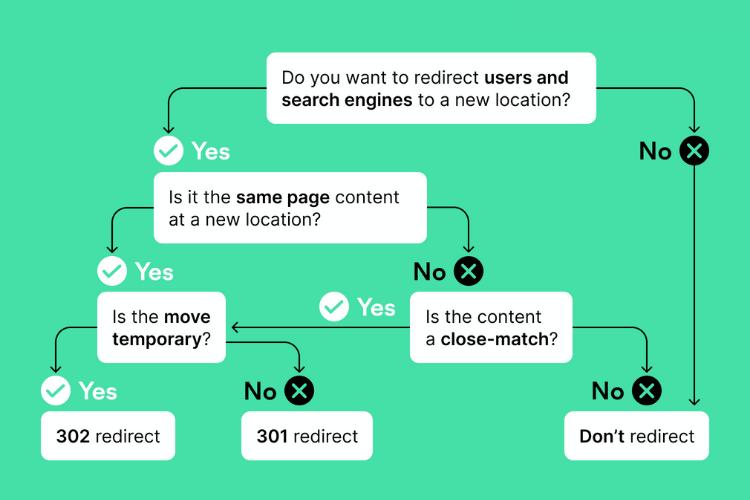
A useful rule is:
Use 301 when the move is permanent. Use 302 when the original URL is expected to return.
That decision should reflect the real purpose of the redirect rather than an attempt to manipulate search rankings.
How to Implement 301 and 302 Redirects
Redirect implementation depends on your hosting environment, web server, CMS, and access permissions.
Apache Redirect Examples
On a properly configured Apache server, a permanent redirect can use:
Redirect 301 "/old-page" "https://example.com/new-page"For a temporary redirect:
Redirect 302 "/temporary-page" "https://example.com/alternate-page"These examples require the appropriate Apache configuration and modules.
Always test configuration changes in a staging environment where possible.
NGINX Redirect Examples
For a permanent redirect:
location = /old-page {
    return 301 https://example.com/new-page;
}
For a temporary redirect:
location = /temporary-page {
    return 302 https://example.com/alternate-page;
}
Reloading the server configuration should only happen after validating its syntax.
WordPress Redirect Configuration
WordPress website owners may manage redirects through hosting settings, server configuration, or a dedicated redirection plugin.
Before implementing a redirect:
- Confirm whether the move is permanent or temporary.
- Identify the correct destination.
- Check whether another redirect already exists.
- Save or apply the redirect rule.
- Test the original URL.
- Verify the final destination and response codes.
If your website uses caching or a CDN, remember that redirect behavior may be affected by rules outside WordPress.
Common Redirect Mistakes During Migration
Even correctly selected 301 and 302 redirects can fail because of implementation errors.
Mistake 1: Redirecting Everything to the Homepage
Sending every removed product or page to the homepage may seem convenient, but it often produces a poor experience.
Visitors expecting a specific product, service, or article are instead shown unrelated content.
Google may also treat irrelevant redirect destinations as soft 404 situations.
Whenever possible, choose a relevant one-to-one replacement.
Mistake 2: Creating Redirect Chains
A redirect chain occurs when one URL redirects through multiple intermediate addresses before reaching its final destination.
For example:
/old-page → /page-v2 → /page-v3 → /final-page
Long redirect chains can introduce unnecessary latency and complicate troubleshooting.
Google recommends redirecting directly to the final destination wherever practical.
Mistake 3: Creating Redirect Loops
A redirect loop occurs when URLs redirect back to one another.
For example:
/page-a → /page-b → /page-a
Visitors cannot reach the intended content because the redirects repeat.
Loops may also prevent search engine crawlers from accessing the destination.
Mistake 4: Using 302 for a Permanent Migration
A temporary redirect is not the recommended signal for a permanent domain or URL change.
Review the redirect configuration to ensure the status code matches the intended move.
Mistake 5: Ignoring Product and Category URLs
E-commerce migrations often involve hundreds or thousands of product-related URLs.
Testing only the homepage is not sufficient.
Important product pages, categories, articles, campaign landing pages, and other URLs with traffic or backlinks should also be mapped and checked.
Mistake 6: Forgetting Internal Links and Sitemaps
Redirects should protect older addresses, but your current website’s internal links should point directly to the final URLs.
Likewise, XML sitemaps should generally reference current, indexable canonical pages rather than retired redirected URLs.
How to Verify 301 and 302 Redirects After Migration
Choosing the correct redirect type is only the beginning. You must also confirm that it works as intended.
A successful verification process should answer several questions:
- Does the original URL return the intended redirect status?
- Does it lead to the correct destination?
- Does the final page respond successfully?
- Are there unnecessary intermediate redirects?
- Are there redirect loops?
- Are any destinations returning 404 or server errors?
- Do important pages remain accessible?
- Are temporary redirects appearing where permanent ones are expected?
Manually checking a few URLs can work for a very small website.
However, migrations involving dozens or hundreds of URLs require a more systematic process.
Step 1: Prepare a Redirect Mapping
Create a spreadsheet containing each old URL and its expected destination.
For example:
For the Altrix tool, use the column names source_url and expected_destination.
Make sure the mapping reflects the real migration plan.
Step 2: Inspect the Actual Redirect Behavior
Test each original address and inspect what happens.
Checking the redirect response alone is insufficient if the final destination is incorrect.
A 301 response pointing to an unrelated page is still a mapping problem.
Step 3: Check Redirect Chains and Loops
Look for URLs that pass through unnecessary intermediate redirects or repeatedly return to an earlier URL.
Where possible, update the redirect rule so the old address points directly to the correct final destination.
Step 4: Review Final HTTP Status Codes
The destination should normally return a successful response when it represents a working public page.
Investigate unexpected 404, 403, 500, and similar responses.
Not every non-200 response is necessarily an error in every application, so interpret results according to the intended behavior.
Step 5: Export and Document the Results
Record the identified errors, expected destinations, actual destinations, and corrective actions.
A documented report is useful for launch approval, client handovers, developer assignments, and post-migration reviews.
Verify Redirects in Bulk With Altrix Redirect Verification Tool
For agencies, store owners, and developers managing many URLs, manual checking can become repetitive.
The Altrix Redirect Verification Tool provides a structured way to inspect website redirects in bulk.
It supports CSV input, redirect-chain inspection, comparison of expected and actual final URLs, and exportable reports.
Key capabilities include:
- Checking up to 500 URLs in one run.
- Identifying 301, 302, 303, 307, and 308 redirect responses.
- Inspecting complete redirect chains.
- Detecting loops and broken destinations.
- Finding HTTP 4xx and 5xx responses.
- Reporting DNS, TLS, and timeout errors.
- Comparing expected destinations with actual outcomes.
- Exporting verification results to CSV.
The application runs locally and contacts the URLs you choose to test. It does not require a WordPress or Shopify connection.
The tool verifies redirect behavior; it does not automatically create or repair redirect rules.
For website migrations and client projects, this distinction is valuable: identify problems accurately, correct them in your server or website configuration, and rerun the checks.
Explore Altrix Redirect Verification Tool
Website Migration Redirect Checklist
Before declaring your website migration complete, use this checklist.
- Create a complete old-to-new URL mapping.
- Use 301 or 308 redirects for permanent moves.
- Use appropriate temporary redirects only when necessary.
- Check that every important URL reaches the intended destination.
- Identify and eliminate redirect loops.
- Minimize unnecessary redirect chains.
- Investigate broken destination URLs.
- Update internal links to their final destinations.
- Update XML sitemaps and review canonical tags.
- Verify important pages in Google Search Console.
- Monitor organic traffic and indexing after launch.
- Keep documented redirect verification results.
Google generally recommends keeping migration redirects for at least one year, and potentially longer to support users following older external links.
Do not remove redirects immediately after search engines begin displaying the new URLs.
For additional guidance, consult Google’s website migration documentation.
Frequently Asked Questions About 301 vs 302 Redirects
Is a 301 redirect better than a 302 redirect for SEO?
Neither redirect is universally better. For permanent website moves, a 301 redirect is normally appropriate because it signals that the destination should replace the old URL. For temporary moves, a 302 is generally more suitable.
Can a 302 redirect become a 301 redirect?
Yes. If a temporary move becomes permanent, you can change the server configuration to return a 301 status. Verify that the new destination is correct and review your other canonicalization signals.
Will a 301 redirect preserve all my Google rankings?
No redirect guarantees unchanged rankings. Permanent redirects help communicate the move and consolidate search signals, but rankings also depend on content, relevance, crawlability, indexing, and other factors.
Does a 302 redirect pass link equity?
A 302 does not automatically mean link equity is lost. Google evaluates multiple signals and primarily treats a 302 as an indication that the move is temporary. Use the code that accurately represents the situation.
How long should I keep 301 redirects after migration?
Google recommends retaining site-move redirects for at least one year. Keeping them longer may be beneficial when users or external websites still link to the old addresses.
Should I use 301 redirects when moving from WooCommerce to Shopify?
Usually, yes, when product, category, and content URLs have permanently changed. Create relevant one-to-one mappings and verify the resulting destination URLs.
How can I check hundreds of redirects?
Create a CSV of old and expected destination URLs, test them using a bulk redirect verification tool, review status codes and final destinations, and export a report for corrections.
Conclusion: Choose the Correct Redirect and Verify the Result
The difference between 301 vs 302 redirects is straightforward: 301 communicates a permanent move, while 302 communicates a temporary one.
For permanent website migrations, domain changes, and URL restructuring, a 301 redirect is usually the correct choice. For short-term maintenance, controlled testing, and genuinely temporary URL changes, a 302 redirect may be more appropriate.
However, selecting the correct status code is only one part of a successful migration.
Every important redirect must lead to the appropriate final destination without broken links, loops, or unnecessary chains.
If your migration involves multiple URLs, use a systematic verification process rather than relying on manual browser checks alone.
With the Altrix Redirect Verification Tool, you can inspect redirect paths, identify errors, and produce structured CSV reports to support a more reliable website launch.